
The short answer
You asked a direct question, so here's a direct answer: use something that saves the idea with its key, its chords, its words and its place in the song, not just the audio. The app I use for this is Melodoodle, a free songwriting sketchpad that you get from Google Play on Android, or install from the browser on iPhone. On Android you install it from the Play Store; on iPhone you open melodoodle.app in Safari and add it to your home screen. Either way, from then on it opens like any other app and works offline.
It's built around the exact moment you're describing. You have a hum, maybe a line, maybe the ghost of a chord, and roughly ninety seconds before your brain lets go of it. Melodoodle gives you a scratchpad to catch it, a shuffle button that finds a key and chord flow that fits what you hummed, and a place inside a song structure where the idea can wait for you with its chords already under it.
Now the longer answer, because I don't think any app fixes this on its own. The reason your memos die isn't the recorder. It's what a recorder leaves out. Let me explain what I mean, because once you see it you'll capture ideas differently even if you never install anything.
Why New Recording 47 is a stranger two weeks later
I once sat down and counted. 212 voice memos on my phone. About 180 of them named New Recording followed by a number. I opened twenty at random. Three of them I recognised. The rest were me humming something with total conviction, in a car, in a stairwell, once clearly in a supermarket, and I had no idea what any of them were for.
Sounds familiar? Here's what I finally understood. When you hum into a recorder, you're not saving the idea. You're saving one slice of it. The rest of the idea (what key you were in, what chord you heard under it, the words that made you reach for the phone, whether this was the big chorus moment or a quiet verse) was in your head at the time, and it felt so obvious you didn't bother saving it.
Two weeks later that context is gone. What's left is a pitch curve with no harmony, no lyric and no job. It's a melody with amnesia. You can hear it's good, you just can't hear where it goes, and that's why you close the memo and never open it again.
The problem was never capturing the idea. It was capturing it in a form I could come back to.- Pablo Domínguez
What a usable sketch actually needs
Now, let's talk about what a sketch needs to survive. Not a demo, not a production, a sketch. After a lot of dead memos, I landed on four things. If a capture has all four, I can pick it up months later and keep writing. If it's missing two or more, it's basically gone.
- The melody: the actual notes you hummed, in a form you can play back and, ideally, see.
- The words that came with it: even one line, even a title. Words anchor a melody to a meaning.
- A rough harmony under it: the key and a chord or two. This is what tells you which notes are 'home'.
- A place in a structure: is this the chorus? A verse? A pre-chorus lift? The same melody means different things in different seats.
That fourth one is the one everybody skips, and it's the one that hurts most. A hook you hum as a chorus has to be sung against something quieter. A line you hum as a verse needs somewhere to go. If you don't note the seat, you'll come back and try to build the wrong song around it.
I get that this sounds like a lot to do in ninety seconds. It isn't, if the tool is built for it. But here's the trick, and here's the honest part: most capture apps do exactly one of these four.
A voice recorder gets the melody. A notes app gets the words. A chord app gets the harmony, as long as you already know the chords. A DAW gets the structure, once you've set up a project, picked a tempo and found your headphones. Each one is fine at its job. The problem is the handoff. You record the hum, switch to notes for the line, open the chord app to check whether that was a C or an Am, and somewhere between app two and app three the melody is gone. Switching between four apps is precisely how the idea escapes.
So the question isn't which recorder. It's: what lets me do all four in one place, fast enough that the idea is still in my head when I finish?
Capturing an idea in Melodoodle, start to finish
Let me walk through a real capture, the way it actually happens, using a song of mine that's still a sketch. It's called Halfway. I'll show you the screens as we go, because this is easier to see than to describe.
Step 1: Catch it in the Ideas scratchpad
The first thing you touch is the Ideas scratchpad. It's a list of voice memos and text notes that live inside the app, next to the songs they belong to. You tap the mic and hum, or you type the line. Ten seconds. That's the whole first step, and it's the only step that has to happen while the idea is hot.
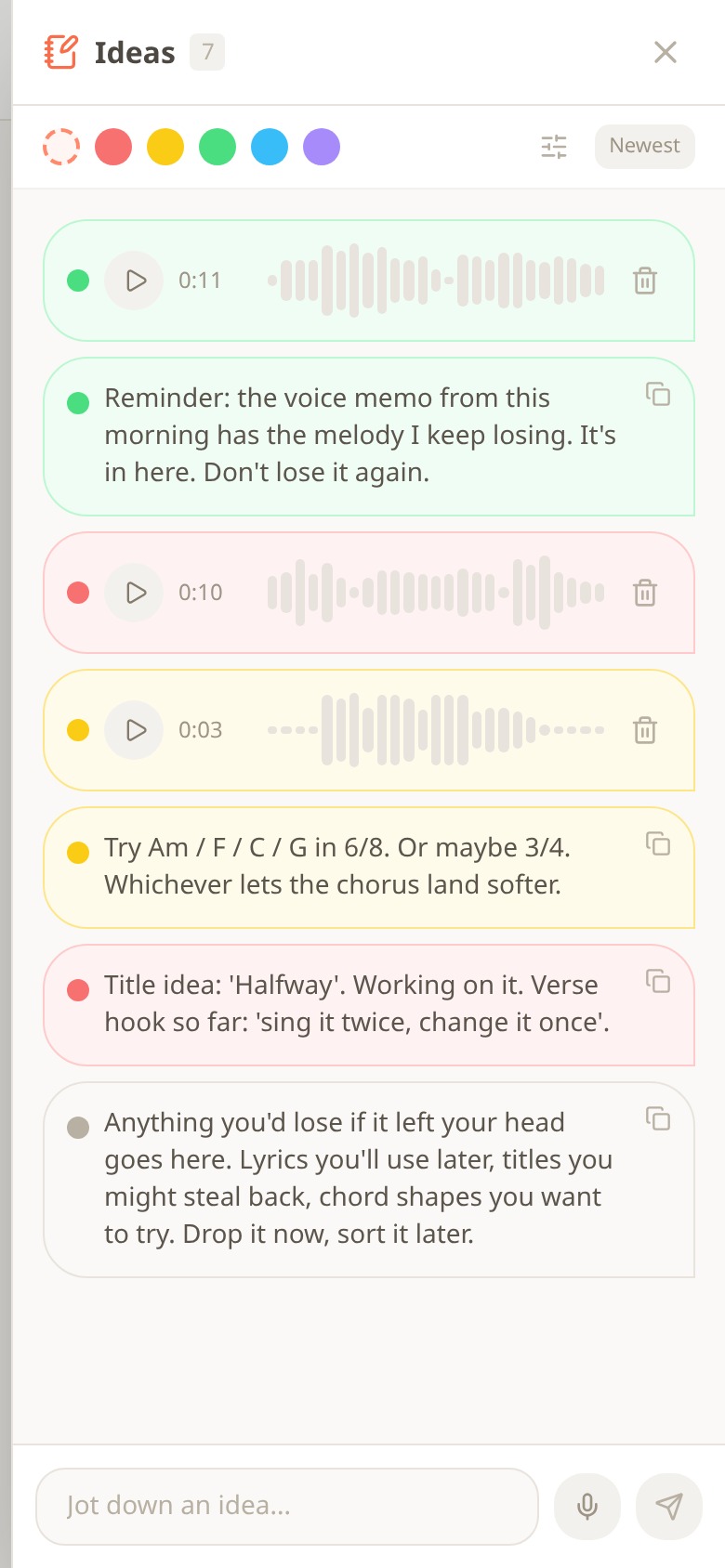
The Melodoodle Ideas scratchpad with seven colour-tagged entries: three short voice memos and four text notes about chords, a title and a hook
That's my actual scratchpad for Halfway, seven entries. Three are voice memos (0:11, 0:10 and a 0:03 one that's literally just the chorus lift). The rest are text: a note reminding me that the morning memo has the melody I keep losing, a chord idea (Am / F / C / G in 6/8, or maybe 3/4), and the title with the verse hook so far: sing it twice, change it once. Each one is colour tagged, so the green ones are the melody, the red ones are the title and lyric, the yellow ones are harmony. The grey note at the bottom is the app's own prompt: anything you'd lose if it left your head goes here, drop it now, sort it later.
Notice what's different from a recorder already: the hum and the words it came with are next to each other, and they're filed under the song, not under a timestamp.
Quick tip: type the words first if you have them, then record the hum. Words take three seconds and they're the part your brain drops fastest. The melody usually sticks a bit longer.
Step 2: Let Doodle find the key and chords
Now the idea is safe, you can spend another minute giving it a body. Tap the plus button to start a new song, and you get three ways in.
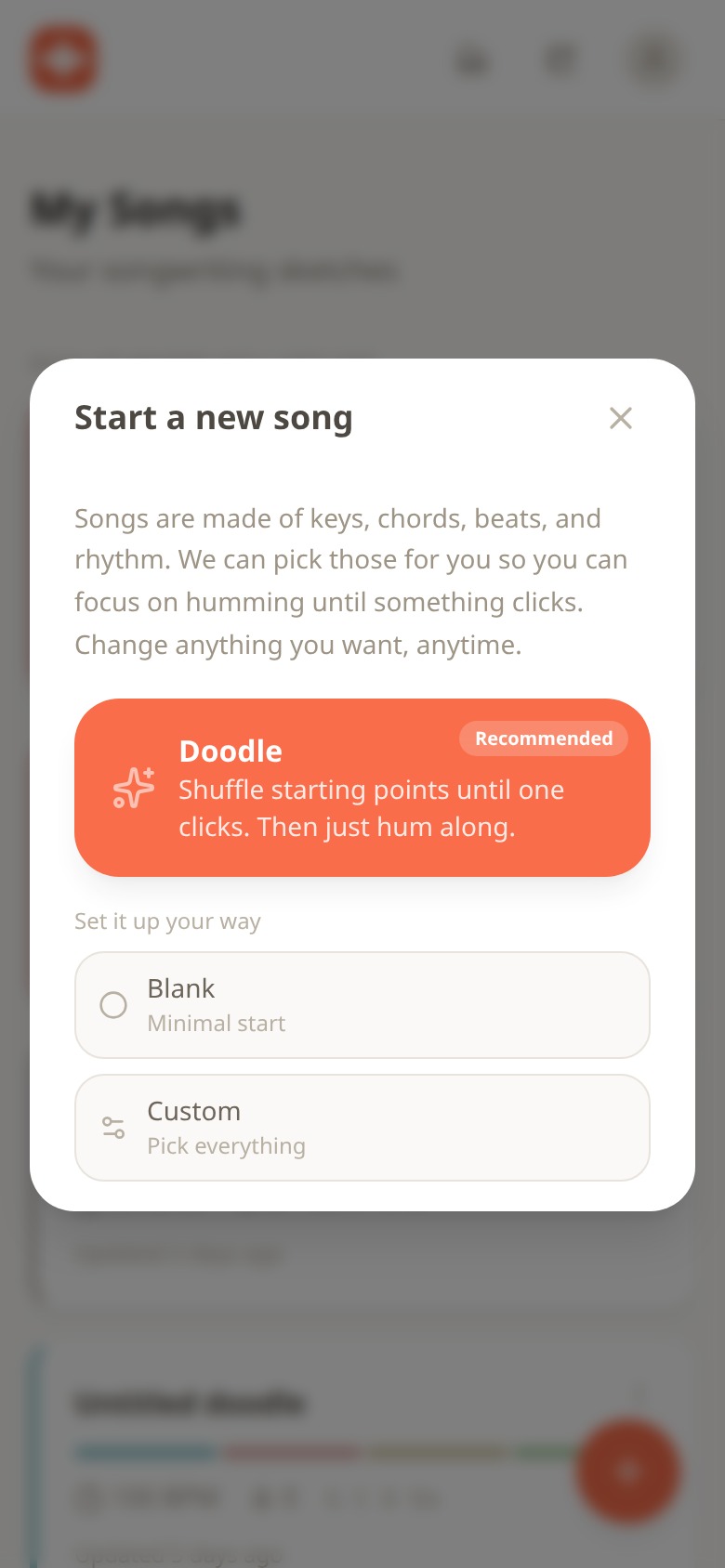
The Start a new song dialog with Doodle highlighted as recommended, plus Blank and Custom options underneath
Doodle is the one marked Recommended, and it's the one I use for captures. It shuffles a starting point for you: a key, a chord flow, a beat and a strum pattern. You press play and hum your idea over it. Doesn't fit? Shuffle again. Usually within two or three shuffles something lands, and that moment is important, because you've just found the key and harmony of a melody you couldn't name a minute ago. You didn't have to know theory. You had to hum and listen.
The other two starts are there when you already know what you want. Blank gives you a minimal start. Custom lets you pick everything: key, chords, drum preset (there are 30 across pop, rock, jazz, latin, electronic and hip hop, with names like Funk Build and Latin Full), strum pattern (Old Faithful, Driving Rock and others) and instrument (25 or more, including a sampled real piano, harmonium, electric piano, synths and pads). The sounds are pre-built and download in seconds, so nothing sits there rendering while your idea fades.
Step 3: Drop it into a section
This is the step that solves the fourth problem, the seat. A Melodoodle song is made of sections: verse, chorus, bridge, outro, whatever the song needs, and you can start from a structure template. Each section holds its own chords, rhythm, melody layer, lyrics and recorded takes. When you drag your idea into Chorus 1, it isn't floating anymore. It's the chorus, and it already has the chords Doodle found sitting under it.
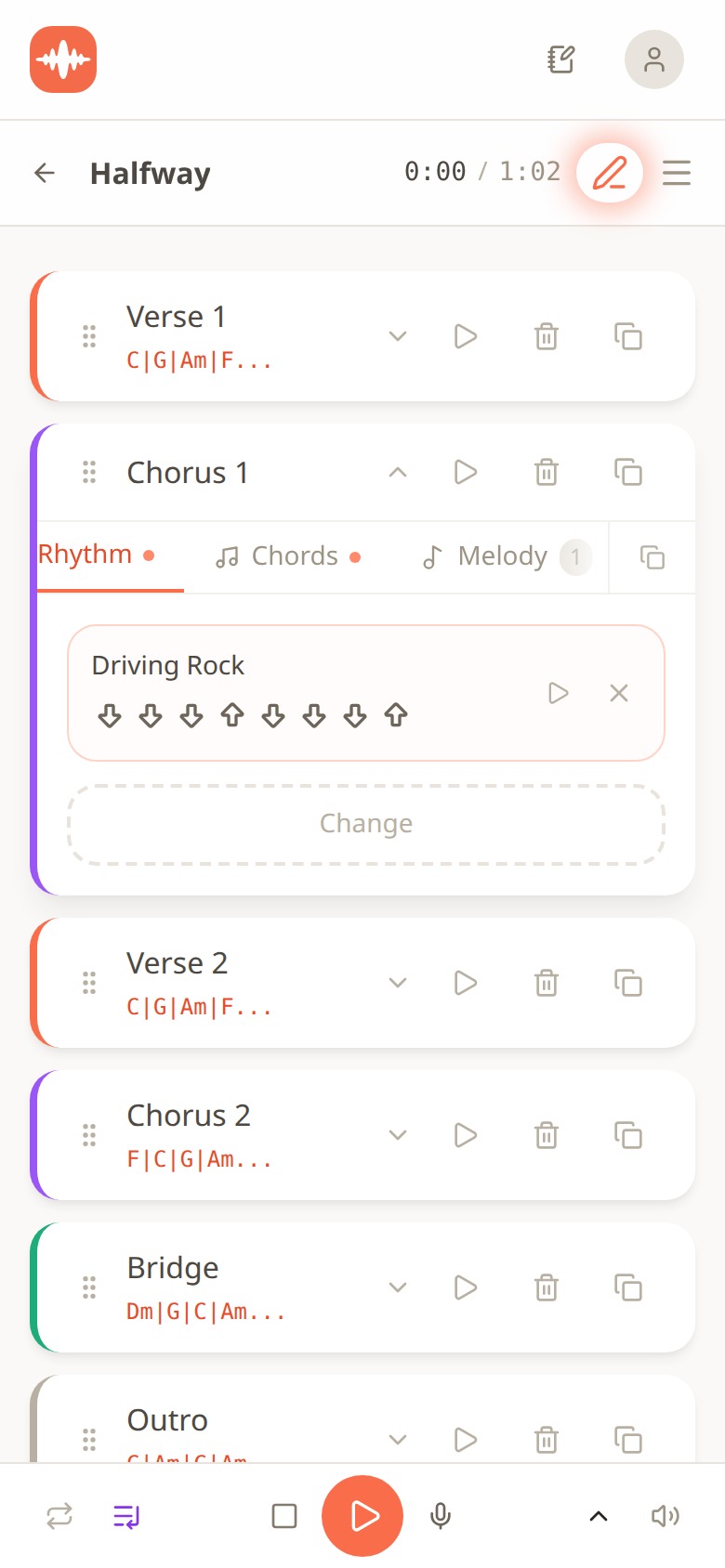
The song Halfway laid out as sections: Verse 1, Chorus 1 expanded to show its Driving Rock rhythm, Verse 2, Chorus 2, Bridge and Outro, each with its own chord progression
Here's Halfway as it stands, 1:02 long. Verse 1 and Verse 2 sit on C | G | Am | F. Chorus 1 is expanded so you can see its three tabs: Rhythm (set to Driving Rock, with the down-down-down-up strum shown as arrows), Chords, and Melody, which has one layer in it already. Chorus 2 flips the order to F | C | G | Am, the Bridge goes to Dm | G | C | Am, and there's an Outro. Every section has its own play button, so I can audition just the chorus without sitting through the verse.
Two things make this fast enough for a capture. First, Propagate: whatever I set in one verse copies to every other verse, so I'm editing one and the others follow. Second, the Melody Creator: I can draw the melody on a grid, or just sing it and the audio-to-pitch detector turns what I sang into notes. That 0:11 hum from the scratchpad becomes actual notes I can see against the chords. That's the moment the melody stops having amnesia.
Then the words. Each section has a lyrics editor where each line sits aligned with the chords under it, with rhyme suggestions in English and Spanish if you get stuck on a line. When I want to sing it, I record a take per section with a teleprompter showing the current lines, keep a few takes, and layer them for doubles or a harmony. If I already have a backing track, I can upload an MP3, WAV or M4A and sketch on top of that instead.
Quick tip: don't finish the song. That's not the job right now. The job is a chorus section with chords, a melody layer and one lyric line. That's a sketch that will still make sense in March.
Step 4: Let it wait for you in the Songs view
Now compare where this idea lives versus where New Recording 47 lives.
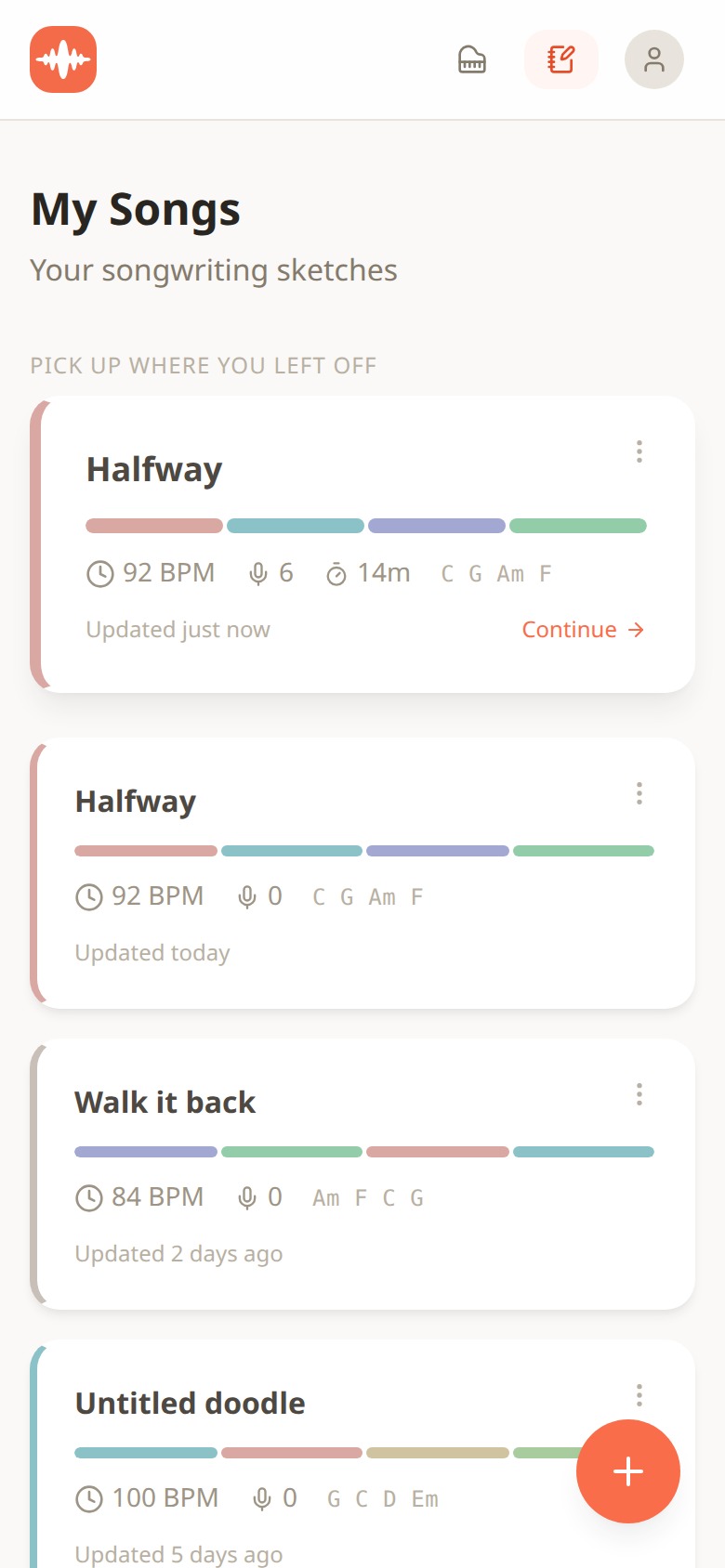
The My Songs view showing sketches as cards with tempo, take count, chords and a Continue button on the most recently edited song
This is the Songs view. Halfway sits at the top under Pick up where you left off, with a Continue button, and the card tells me everything a memo never could: 92 BPM, 6 takes recorded, 14 minutes of work so far, chords C G Am F, and a coloured bar showing its four section types. Below it, Walk it back at 84 BPM on Am F C G, and an untitled doodle at 100 BPM on G C D Em that I haven't touched in five days. I know what each one is before I open it.
That's the whole difference in one screen. A memo waits for you as a timestamp. A sketch waits for you as a song with a key, a tempo and a shape.
Installing it, and what it costs
Let me be plain about the install, because on some devices it's a little different from what you're used to. Melodoodle is on Google Play for Android, but it is not on the Apple App Store. On iPhone and desktop it's a web app you install from the browser, and it takes about twenty seconds:
- iPhone: open melodoodle.app in Safari, tap the Share button, then Add to Home Screen.
- Android: install it from Google Play at https://play.google.com/store/apps/details?id=app.melodoodle.www.twa.
- Desktop in Chrome or Edge: click the install icon in the address bar.
- macOS Safari: File, then Add to Dock.
Once it's installed it opens full screen like a native app and works offline, which matters when your idea shows up on a plane or in a basement rehearsal room with no signal. The version as I write this is 0.28.0 (July 2026), and it updates itself the next time you open it with a connection.
Money, equally plain. Melodoodle is free, fully functional, with no walls and no account needed. Everything I showed you above (Ideas, Doodle, sections, chords, rhythms, Melody Creator, lyrics, recording, layering) is in the free version. There's a Pro tier that adds voice effects (reverb, compression and equalizer presets), export to MP3, export to MIDI, and Publish and Share with an artist profile. The Pro price is shown inside the app, so I won't quote it here in case it changes.
Two more checkable details. The interface is in English and Spanish, and the rhyme suggestions work in both languages, which for me as a bilingual writer was the thing that made me stay. Chord names can show as letters (C, Am, F) or as solfège (Do, Lam, Fa), whichever way your brain reads music. If you want the longer explanation of the whole thing, the site at melodoodle.io covers it; the app itself is at melodoodle.app.
One expectation to set. Melodoodle is a sketchpad, not a production tool. It isn't trying to replace your DAW. The point is to capture the idea before it escapes, with enough structure that you can develop it later, either inside Melodoodle or by taking the MIDI and the chord chart into whatever you produce in.
A two-minute capture routine you can run tonight
Here's the routine I actually follow. It works in Melodoodle, and honestly most of it works with a recorder and a notes app if you're disciplined about it. The app just removes the switching.
- 0:00 to 0:15. Record the hum. Don't tidy it. Two passes if you can, the second one slightly slower.
- Say the words out loud on the recording, even if it's only a title or one line. Then type them. Words go first because they vanish first.
- Say the seat. Literally say 'this is the chorus' or 'this is a verse' into the memo, or tag it that way. It takes two seconds and saves the whole idea later.
- 0:30 to 1:30. Find one chord. If you have an instrument, find the note the melody keeps landing on and try the chord built on it. If you're in Melodoodle, hit Doodle and shuffle until one fits.
- 1:30 to 2:00. Give it a name. Not 'New Recording'. A title, a phrase from the lyric, anything you'll recognise in a list of forty.
- Stop. Do not finish the song. Finishing is a different night.
Six steps, two minutes, four things saved. Do that for a month and go back through the list. I'd bet you'll recognise every single one, which is a very different experience from scrolling past New Recording 47 for the third year running.
And if you try it, in Melodoodle or in your own setup, tell me how it went. I'm especially curious whether saying the seat out loud helps you as much as it helped me.
Questions people also ask
Can I sketch a song on my phone if I don't know chords or music theory?
Yes. In Melodoodle, Doodle picks a key, a chord flow, a beat and a strum for you, and you hum until one fits. The key hints and transpose-in-two-taps mean you never have to name a chord yourself if you don't want to.
Does Melodoodle work offline?
Yes, once you've installed it (from Google Play on Android, or from the browser on iPhone and desktop). Sounds are pre-built and download in seconds the first time, so after that you can sketch with no connection.
Is Melodoodle on the App Store or Google Play?
It's on Google Play for Android. It isn't on the Apple App Store, so on iPhone you install it from the browser: Safari's Share button, then Add to Home Screen.
Is the free version actually usable, or is everything locked?
The free version is fully functional with no walls and no account. Pro adds voice effects (reverb, compression, EQ presets), MP3 export, MIDI export, and Publish and Share with an artist profile; the price is shown in the app.
Can I turn a hum into actual notes?
Yes. The Melody Creator lets you sing or hum into the phone and the audio-to-pitch detector converts it into notes on a grid, sitting over the chords of the section you're in. You can also draw the melody directly if you prefer.

Pablo Dominguez
Full Stack Developer passionate about building interesting projects and learning new skills.