
Short answer: yes. Melodoodle is a songwriting sketchpad that is free forever, fully functional, works offline once installed, and never asks for an account. On Android it is on Google Play; on iPhone you open melodoodle.app in Safari and add it to the home screen (it is not on the Apple App Store), and on a desktop you install it from the browser. After that, it opens like any other app and keeps working with the signal off.
That is the answer. But I want to spend a few minutes on the question, because free, offline and no account get stretched so thin these days that they barely mean anything. If you have ever downloaded a "free" app and hit a paywall on the second screen, you know what I mean. Sounds familiar?
Set the bar: what those three words should mean
Here is the bar I hold any creative tool to, and I think you should too.
Free means fully usable. Not a seven day trial, not three songs and then a wall, not a version where the export button is greyed out until you pay. You should be able to write a complete song, save it and come back to it next week without a card on file.
Offline means the sounds are on the device. A lot of music apps look like they work offline until you tap play and the piano has to be fetched from a server. If the instruments, the drums and your own recordings are not stored locally, it is not an offline app. It is an online app with a nice loading spinner.
No account means no email before the first chord. Not "sign in with Google to continue", not "create a profile to save your work". A sketch of a song is personal. It is a half-formed thought you are not ready to show anyone, and the tool holding it should not need permission from a server to let you hear it back.
A song idea belongs to the person humming it, not to the database it was uploaded to.- Pablo Domínguez
Why songwriting needs this more than most hobbies
Now, let's talk about where songs actually arrive. In my experience, almost never at a desk with good wifi. They show up on a train between two stations with no coverage. They show up backstage, ten minutes before a set, when your phone is on airplane mode so it does not buzz through the monitors. They show up at 2 am, when the last thing you want is a login screen glowing in your face.
And the idea is fragile. A melody you have not sung twice is already leaving. If the app needs a signal to load its sounds, or a password reset because you forgot which email you used, the idea is gone by the time you get in. I have lost more choruses to sign-up walls than to bad singing, and I am not a great singer.
So the requirement is not a nice-to-have. The distance between the idea and the record button has to be zero taps of friction. Everything else in the app matters less than that.
The app: Melodoodle, and how to install it
Melodoodle is built around that idea. The tagline is "Doodle a song, write the lyrics, sing it," and that is the whole workflow: pick chords, set a rhythm, draw or hum a melody, write lyrics under the chords, record takes per section. It is made for singers, by a singer (that would be me), and it is a sketchpad, not a production tool. The point is to catch the idea and give it enough structure to develop later, here or in a DAW.
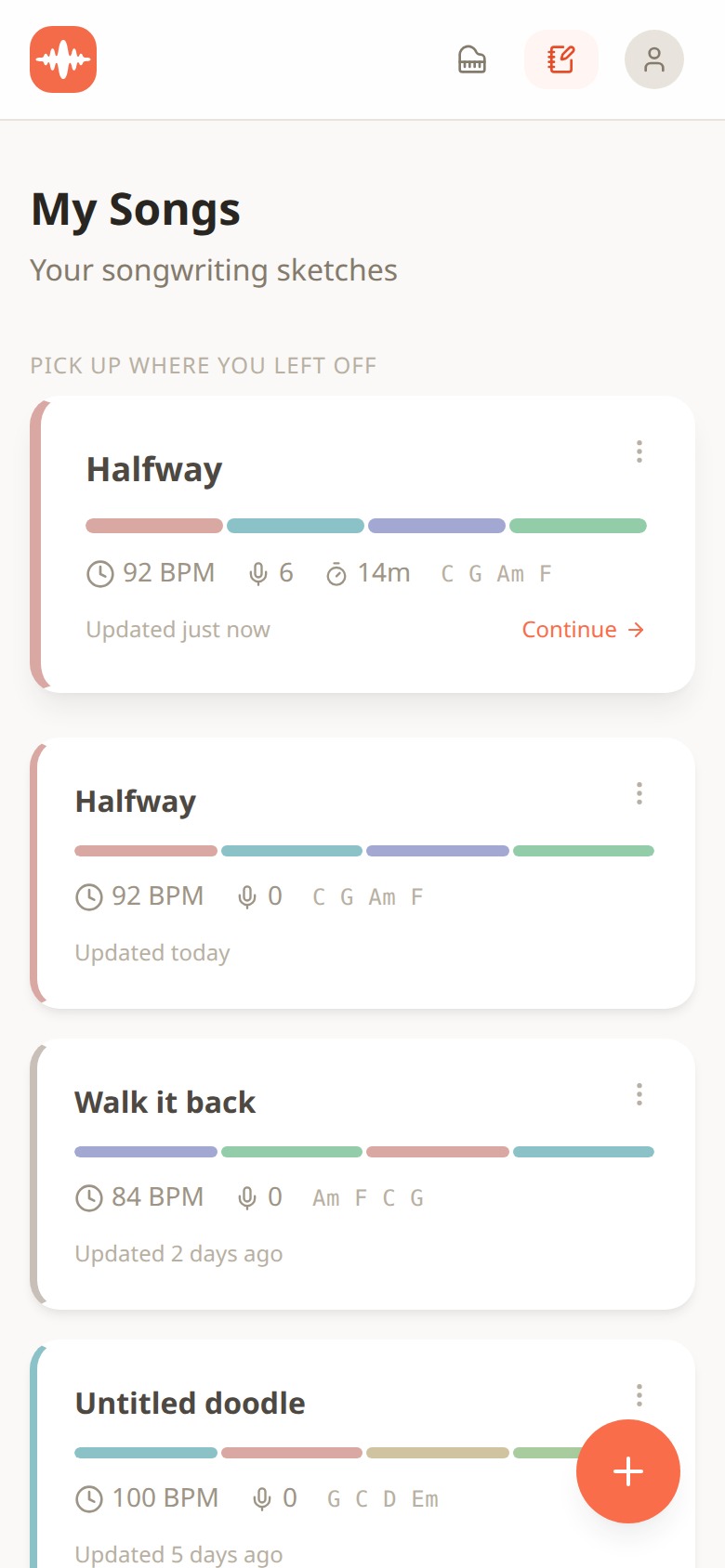
Melodoodle Songs view listing sketches with BPM, chords and section bars, no login prompt
This is the Songs view, which is what you see when you open the app. Notice what is not there: no login, no "sync to cloud" nag. Each card is a sketch stored on the device, with its BPM, chord progression (C G Am F on Halfway, Am F C G on Walk it back), coloured bars for the sections and the number of takes recorded. You tap Continue and you are back in the song.
Installing it takes about a minute. Here is the route on each platform:
- iPhone: open melodoodle.app in Safari, tap the Share button, then Add to Home Screen.
- Android: install it from Google Play at https://play.google.com/store/apps/details?id=app.melodoodle.www.twa.
- Desktop Chrome or Edge: click the install icon in the address bar.
- macOS Safari: File, then Add to Dock.
The sounds are pre-built and download in seconds on that first visit (a sampled real piano, harmonium, electric piano, synths and pads, 25 or more instruments in total, plus 30 drum presets and strum patterns). Nothing is synthesized on demand, so once they are on the device, they stay there. Airplane mode, basement rehearsal room, whatever.
Quick tip: install it while you still have wifi, open one song and press play once. That guarantees the sounds are cached before you need them somewhere with no coverage.
The Ideas scratchpad also works with no connection, and this is the part I use most at 2 am.
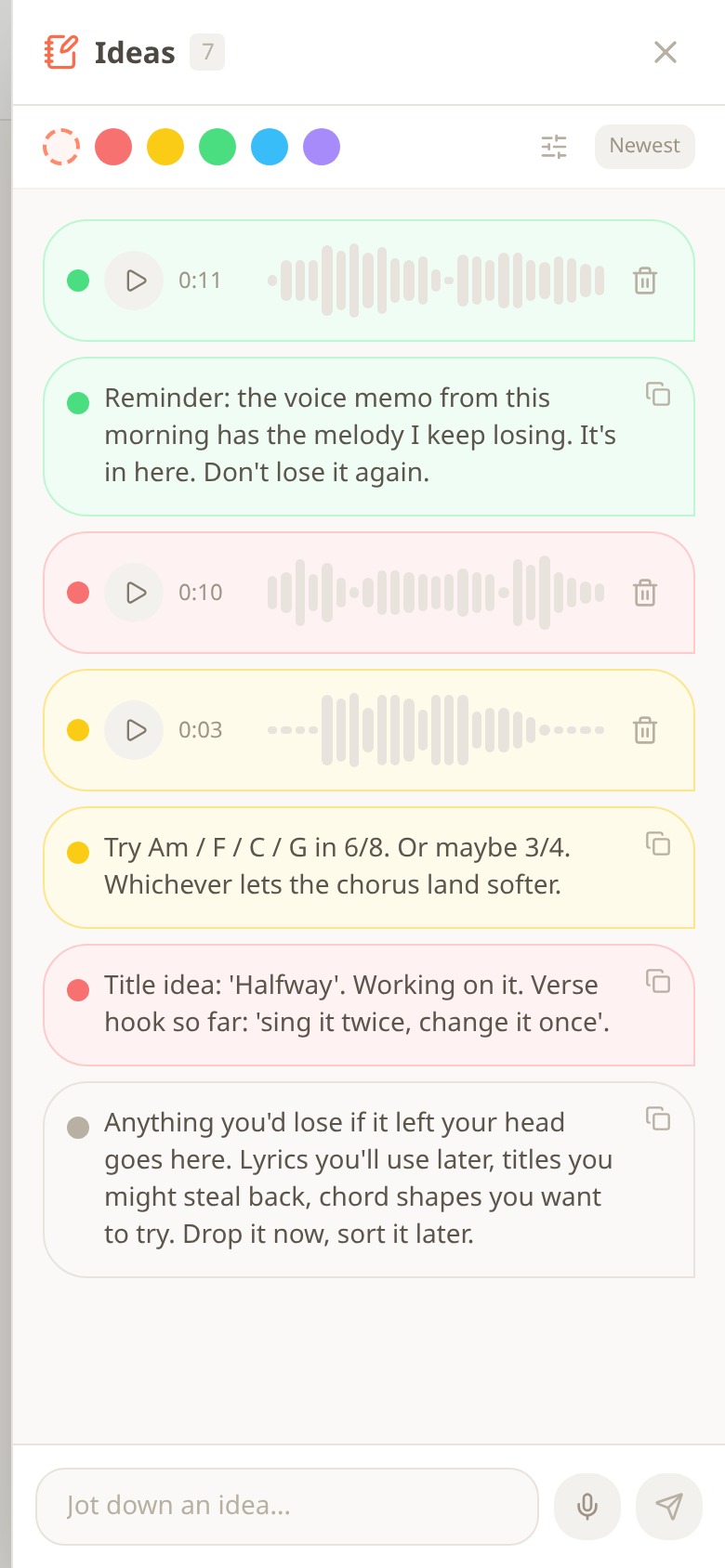
Melodoodle Ideas scratchpad showing colour-tagged voice memos and text notes next to a song
Voice memos and text notes sit side by side, colour tagged, right next to the song they belong to. In the screenshot you can see three short recordings (11, 10 and 3 seconds), a chord idea ("Try Am / F / C / G in 6/8"), a title note and a reminder about a melody that kept escaping. Drop it now, sort it later. You do not need an account to hum into it, and the memo does not leave your phone.
Now, the honest part about money. I get that "free forever" makes people suspicious. Everything described above is free and fully functional. There is a Pro tier, priced inside the app, that adds four things: voice effects (reverb, compression and equalizer presets), export to MP3, export to MIDI, and Publish and Share with an artist profile. If you never want those, you never hit a wall. The interface is in English and Spanish, rhyme suggestions work in both languages, and chords can be shown as letters (C, Am, F) or solfège (Do, Lam, Fa). The full feature list lives at melodoodle.io if you want to check anything I have said here.
A checklist for any creative app
Whether or not you install Melodoodle, here is the test I run on any tool that wants to hold my unfinished work. It takes five minutes and saves a lot of regret.
- Can I do the core thing (write, record, hear it back) before typing an email address?
- Turn on airplane mode. Does it still open, and does sound still play?
- Is there a hard limit on the free tier (number of projects, days, exports) or only extra features?
- Where is my work stored, on the device or only on their server?
- If the company disappeared tomorrow, would I still have my sketches?
If an app fails the first two, it is not the app for the train or the backstage corridor. It might be a fine studio tool. Just do not trust it with the fragile stuff.
Questions people also ask
Does Melodoodle work without internet?
Yes. Once you have installed it (from Google Play on Android, or from the browser on iPhone and desktop) and the sounds have downloaded (a few seconds), it runs fully offline, including playback, recording and the Ideas scratchpad.
Do I need to create an account to use it?
No. You open the app and start a song. There is no email, password or social login before the first chord.
Is Melodoodle really free, or is it a trial?
It is free forever and fully functional. Pro adds voice effects, MP3 export, MIDI export and Publish and Share; everything else stays free with no time or song limit.
Is it in the App Store or Play Store?
It is on Google Play for Android. It is not on the Apple App Store, so on iPhone you install it from Safari with Add to Home Screen; on desktop you use the install icon in the address bar (or File, then Add to Dock in Safari), and it behaves like a native app after that.
Can I use it in Spanish?
Yes. The interface is available in English and Spanish, rhyme suggestions work in both, and chords can be shown as letters or as Do, Re, Mi solfège names.
If you have a tool that passes the checklist and I have not heard of it, tell me in the comments. And if you catch an idea on a train tonight, let me know whether it made it home.

Pablo Dominguez
Full Stack Developer passionate about building interesting projects and learning new skills.