
For about two years I kept a folder of lyrics I could recite but not sing. I'd sit down with the guitar, play the chords, open my mouth, and what came out was speech with a pulse. Good words, decent chords, zero tune. Sounds familiar?
Here's the direct answer. A melody is mostly rhythm plus a small set of notes from the key you're already in. The fastest way to find one is to loop the chords of one section (a loop you don't have to play yourself), speak the line over it with exaggerated rhythm, and keep going until a pitch attaches to the stressed words. Then you fix the two habits that make everything sound flat: starting every line on the root, and copying the chord notes exactly.
The tool I use for the looping and capturing part is Melodoodle, a songwriting sketchpad you get from Google Play on Android or install from the browser on iPhone. You loop one section, sing over it with your lyrics on a teleprompter, and either draw the melody on a grid or hum it and let the pitch detector write the notes down. But let's do the songwriting part first, because it works with any loop you can get your hands on.
A melody is rhythm first, notes second
Try this: clap the chorus of any song you like without singing a single note. Most people around you will still name the song. The rhythm carries more of the identity than the pitches do, and the rhythm is something you already have, because your lyrics have stresses. Every line has two or three words that land harder than the rest.
Now the notes. A major key has 7 of them. Most pop melodies use 5 or 6, and a lot of hooks sit on 3 or 4. So the thing you're afraid of, "finding the notes", is a search across a handful of options, not an infinite space. The hard part isn't the size of the choice. The hard part is committing to one.
And you already sing when you talk. Say "I told you so" the way you'd say it to a friend who ignored your advice. Your pitch jumps up on "told" and falls on "so". That's a melody with three notes. Exaggerate what speech already does and you're singing.
Loop the chords and talk over them
This is the core move, and it's embarrassingly simple.
- Loop 4 or 8 bars of one section (verse or chorus, not the whole song) at the tempo you imagine it.
- Speak the first line over the loop at full voice, stretching the stressed syllables and rushing the unstressed ones. Overdo it. Sound like a bad stage actor.
- Repeat the same line 10 or 20 times without stopping the loop. Don't try to sing yet.
- Notice the moment a stressed word settles on one pitch and stays there on the next pass. That's your first note. Lock it.
- Let the unstressed syllables fall wherever they want between the locked notes. They mostly just walk toward the next stressed word.
Now, let's talk about why the loop has to run without you. When your hands are on the guitar, half your attention is on the next chord change, and your voice takes the easy road: it sings whatever note your fingers are already playing. You also stop and restart every time you stumble, and the restart kills the repetition that makes pitch settle. A loop that plays itself lets you fail 30 times in three minutes, and failing fast is the whole method. A phone loop, a drum machine, a backing track, anything that keeps going while you talk.
Quick tip: record the whole babbling session, not just the good moment. The pass where the pitch first attached is usually two or three passes before you noticed it.
Two traps, and the two moves that fix them
Once a pitch attaches, you'll get something that sings. It will also, nine times out of ten, sound like a nursery rhyme. That's not a talent problem. It's two very specific habits.
Trap 1: starting every line on the root. In C major, every line begins on C. Your ear goes there because it feels safe, and it is safe: it's so resolved that the line has nowhere to go. It sounds finished before it started.
Move 1: start the line on a note other than the root. Take the first stressed word and push it one note up or down from where it landed. In C, try starting on E, G or A. The line now has to travel somewhere, and that travel is what people hear as "melody". You can still end on the root. Just don't begin there every time.
Trap 2: copying the chord notes exactly. The chord is C, so you sing C, E and G. The chord moves to F, so you sing F, A and C. You're doubling the guitar. The melody disappears into the chords because it is the chords.
Move 2: hold a note across a chord change. Say your loop is C, G, Am, F. Sing an E over the C chord (it belongs there) and then keep singing E when the chord moves to G. E isn't in a G chord (G, B, D), so for a beat there's friction, and then you step down to D and it resolves. That one held note does more for a melody than any clever leap. It's the difference between "the chords, sung" and a tune that sits on top of them.
Speech already has the rhythm and the stresses. Your only job is to stop landing on the obvious note.- Pablo Domínguez
Doing this in Melodoodle
I get that all of this sounds like a lot of stopping to press buttons. Melodoodle is built around exactly this workflow, so the friction is low. A song is made of sections (verse, chorus, bridge, outro), and each section holds its own chords, a rhythm, a melody layer, its lyrics and its recorded takes. You pick one section, set the chords with the chord picker (as letters like C, Am, F, or solfège like Do, Lam, Fa), choose a strum pattern such as Old Faithful or one of the 30 drum presets, and press play. That's your loop, and your hands are free.
When you hit record, the lyrics for the current section show up on a teleprompter so you're not hunting through a notebook while the loop runs. In the screenshot below the section is Chorus 1, the four lines of the chorus are on screen, the take is 1.48 seconds in, and the words being sung are highlighted as you go. You talk or sing over the loop, stop, and the take is saved to that section.
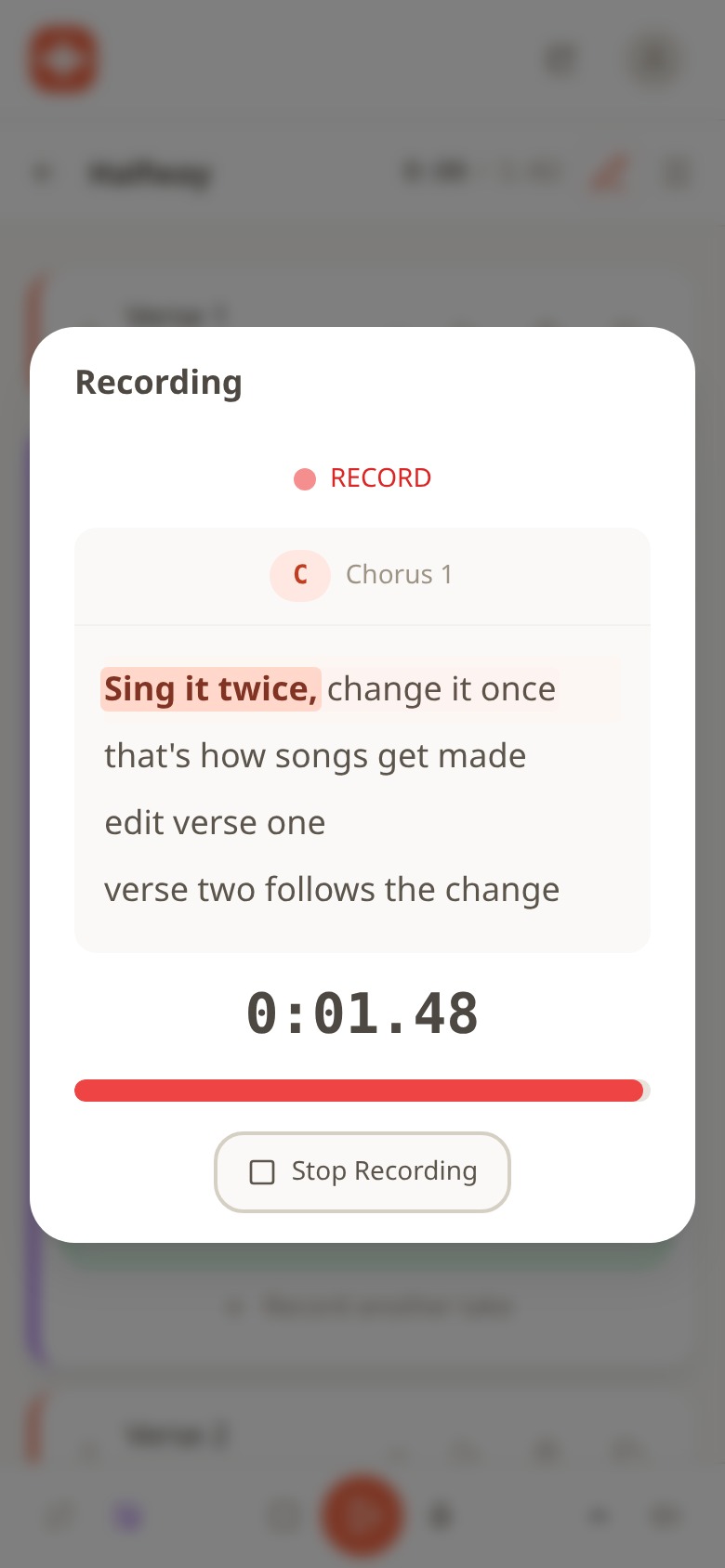
Melodoodle recording a take on Chorus 1 with the teleprompter showing the four lyric lines and a timer at 0:01.48
Then you have two ways to pin the melody down. The first is the Melody Creator: a grid where each row is a note and each column is a beat, drawn over the section. Turn on the Scale toggle and the rows snap to the key, so you can only place notes that belong. In the screenshot the section is in E, Scale is on, and the rows run through the notes of E major. Look at where the phrase starts: on G#, not on E. That's Move 1 from above, and the grid makes it a one-tap decision rather than a theory exercise.
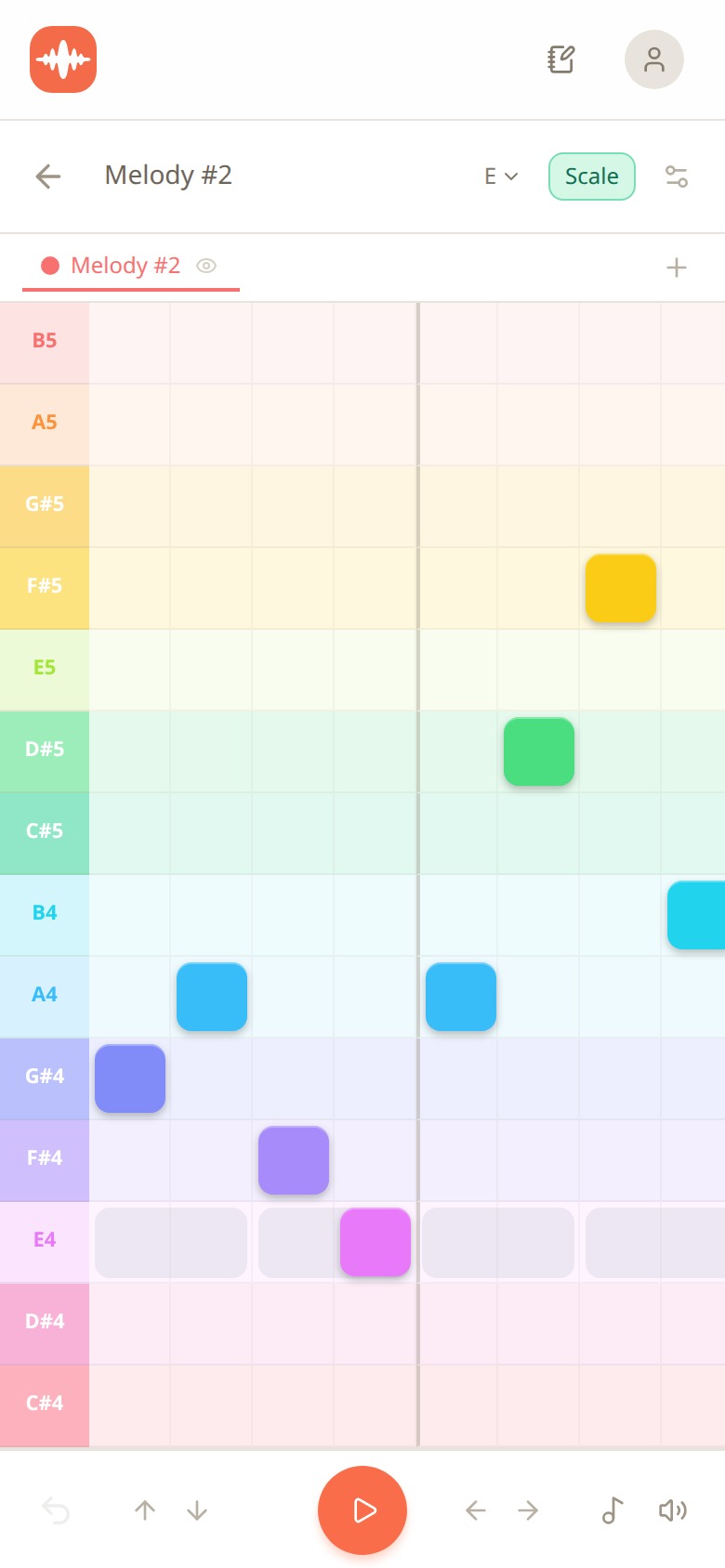
Melodoodle Melody Creator grid in the key of E with the Scale toggle on and a phrase of notes starting on G#4
The second way is to skip the drawing entirely: hum the line and the audio-to-pitch detector writes the notes onto the grid. This is the one I use when the pitch has just attached and I don't want to lose it by thinking. Hum, look at what it drew, then nudge a note or two by hand to apply the two moves.
Two more things that matter for this specific problem. You can keep several takes on the same section and play them back to compare, so you don't have to decide in the moment which version was better. And if the melody you found sits too high or too low for your voice (it happens constantly, because the loop was in whatever key you started in), you transpose the section in two taps and sing it again where it fits.
The ten-minute routine
Here's what I actually do, one section at a time. Ten minutes, phone on the table, no instrument.
- Loop (1 minute): open the section, check the chords, pick a drum preset or strum pattern, press play. Leave it running for the rest of the routine.
- Speak (2 minutes): read the lines off the teleprompter with exaggerated rhythm. Stretch the stresses. Repeat each line until a pitch sticks to a stressed word.
- Hum (2 minutes): drop the words, hum only the stressed notes with the pitch detector on, and let it draw what you hummed.
- Draw (2 minutes): open the Melody Creator, fix anything the detector got wrong, move the first note off the root, and hold one note across a chord change.
- Sing (2 minutes): put the words back on and record a take over the loop.
- Keep the take (1 minute): record one more, compare the two, keep both. Tomorrow you do the next section.
After three or four sessions the speaking step gets shorter, because your ear starts attaching pitch on the first pass instead of the twentieth. That's the skill you're building. The app is just there to hold the loop and catch what comes out.
Free, installable, works offline
Melodoodle is free forever and fully functional: no walls, no account needed. A Pro tier adds voice effects (reverb, compression and equalizer presets), export to MP3, export to MIDI, and Publish and Share with an artist profile. The Pro price is shown inside the app.
On Android it's on Google Play at https://play.google.com/store/apps/details?id=app.melodoodle.www.twa. On iPhone you install it from the browser: open melodoodle.app in Safari, tap Share, then Add to Home Screen (it's not on the Apple App Store). On a desktop in Chrome or Edge, use the install icon in the address bar; on macOS Safari, File then Add to Dock. Once installed it works offline, which matters when the melody arrives on a train.
The interface is in English and Spanish, and the rhyme suggestions in the lyrics editor work in both languages. If you want the longer explanation of what it does and why, that's at https://melodoodle.io.
Questions people also ask
Do I need to know music theory to write a melody?
No. You need to know which key your chords are in, and a scale-snapped grid or a chord picker with key hints handles that for you. Everything else in this post is rhythm and listening.
What if I can't sing in tune?
Hum instead of sing while you search, because humming is easier to keep steady, and let the pitch detector show you what you actually did. If the melody is out of your range, transpose the section and try again lower or higher.
How many notes should a melody use?
Most verses and choruses sit on 5 or 6 notes of the key, and a hook can live on 3 or 4. If your line uses all 7, you're probably wandering; cut it back to the stressed words and see what's left.
Should the melody follow the chords?
Mostly yes, but not exactly. Land on chord tones on the important words and let at least one note hold across a chord change so the melody rubs against the harmony for a beat before it resolves.
Can I write a melody without an instrument?
Yes, and it's often easier, because your voice stops copying your fingers. Set the chords in an app or a loop, let it play, and speak the lines until a pitch shows up on the stressed words.

Pablo Dominguez
Full Stack Developer passionate about building interesting projects and learning new skills.