
I once opened a lyrics file and found three choruses in it. Same song, same hook, and none of them matched. One said "still" where another said "always". The chords written above the third one had drifted from C, G, Am, F to C, G, F, F somewhere around midnight. I honestly couldn't tell you which version I meant to sing. Sounds familiar?
Here's the short answer to "how do I stop rewriting the same chorus": stop writing the song from top to bottom. Write the chorus once, treat it as a block, and place that block wherever it needs to appear. Songs are built from repeated sections on purpose, so your tool should repeat them too. That's the idea behind Melodoodle, a free songwriting sketchpad you get from Google Play on Android or install from the browser on iPhone. It stores a song as sections, so one chorus edited is every chorus edited. I'll show you how it works in a minute. First, the structure lesson, because that's the part that actually fixes the problem.
Songs repeat themselves on purpose
Think about the last song you sang along to in a car. You didn't know the second verse. You knew the chorus, and you knew it by the second time it came around. That's not an accident of memory. That's the structure doing its job.
Most songs you know follow one shape: verse, chorus, verse, chorus, bridge, chorus. Listeners have heard that shape thousands of times, so when your song follows it, they can stop working out where they are and start listening to what you're saying. Each section has a job:
The verse moves the story. Same chords and melody each time, different words each time. Verse one sets the scene (who, where, when). Verse two changes something: time passes, the other person answers, the situation turns. If the words in verse two repeated verse one, there would be no story. Verses should differ.
The chorus is the point of the song, usually with the title in it. Same words, same melody, same chords, every time. Why identical? Because a hook is a hook because you've heard it before. The first time, the listener learns it. The second time, they recognise it. The third time, they sing it. Change a word in chorus two and you spend their attention on spotting the difference instead of singing along. Small variations on the final chorus can work (more on that below), but the default is: don't touch it.
The bridge exists to make you miss the chorus. It appears once, usually after the second chorus, and it steps outside the pattern: different chords (often starting on the IV or the relative minor), a different angle on the lyric, the thing you haven't said yet. Eight bars is typical. Then the chorus comes back and lands harder than it did the first two times, precisely because you took it away.
Some songs add a pre-chorus: two to four lines between verse and chorus that lift the tension, identical each time. And an intro or outro is usually just chorus chords with no vocal, or the hook repeated.
A chorus isn't a section you write three times. It's a section you write once and hear three times.- Pablo Domínguez
Where sketchers go wrong: the linear document
Now, let's talk about how the three-chorus file happens, because it's not a discipline problem. It's a tool problem.
If you write by sketching (a notes app, a voice memo, a page in a notebook), you write in the order you hear the song. Verse one. Chorus. Verse two. Then you need the chorus again, and you type it from memory. One word comes out different. Maybe it's better, maybe you just forgot. Then the bridge, then the chorus a third time, and now you "improve" it while you're there. The chords you wrote in brackets above the lines drift too, because you retyped them as well.
By the end you have three choruses that are all almost the same, and the next time you pick up the guitar you have to hold a small trial to decide which one is the real one. Try moving the bridge earlier and it gets worse: cut, paste, and the chords come along or they don't.
I get that a document feels frictionless. But a document has no concept of "this is the same section as that one". Every chorus in it is a stranger to the others. But here's the trick: a song is not a page. It's a stack of blocks, and some of the blocks are the same block.
Treat the song as a stack of sections
This is where Melodoodle comes in. It's a songwriting sketchpad, not a production tool: the point is to catch the idea before it escapes, with enough structure to develop it later, in the app or in a DAW. And its unit of work is the section.
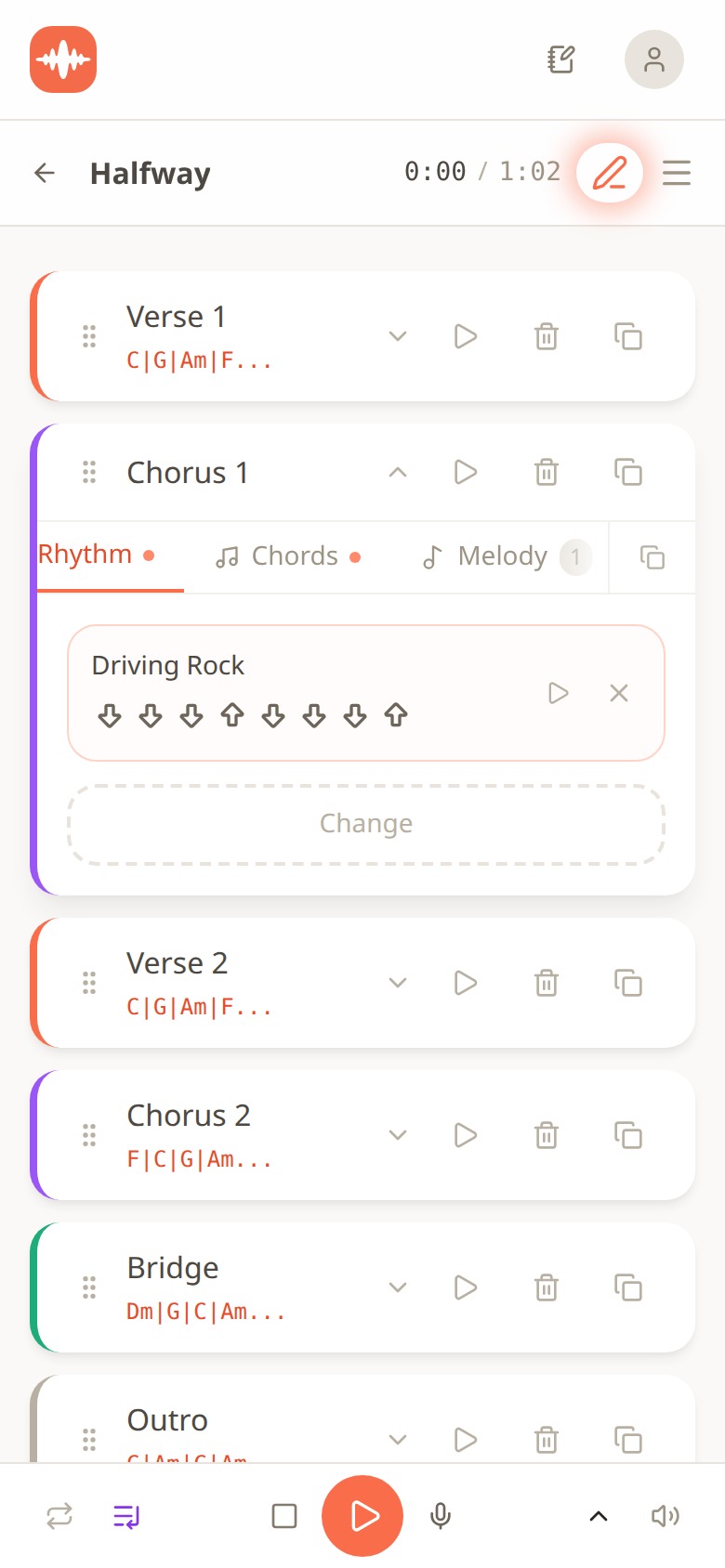
Melodoodle song view showing Verse 1, Chorus 1, Verse 2, Chorus 2, Bridge and Outro as stacked cards, each with its chords, with Chorus 1 expanded on a Driving Rock strum pattern
That's a song called "Halfway", 1:02 long, laid out as cards: Verse 1, Chorus 1, Verse 2, Chorus 2, Bridge, Outro. Each card shows its chords under the name, so you can see at a glance that Verse 1 and Verse 2 both sit on C, G, Am, F and the bridge steps out to Dm, G, C, Am. Chorus 1 is open on its Rhythm tab, set to a strum pattern called Driving Rock (the eight arrows are the down and up strokes). Each section holds its own chords, rhythm, melody layer, lyrics and recorded takes. The dotted handle on the left of every card is for dragging: want the bridge before the second chorus? Drag it. The chords and lyrics travel with it, because they belong to the card, not to the page.
Now the part that answers the question in the title: Propagate.
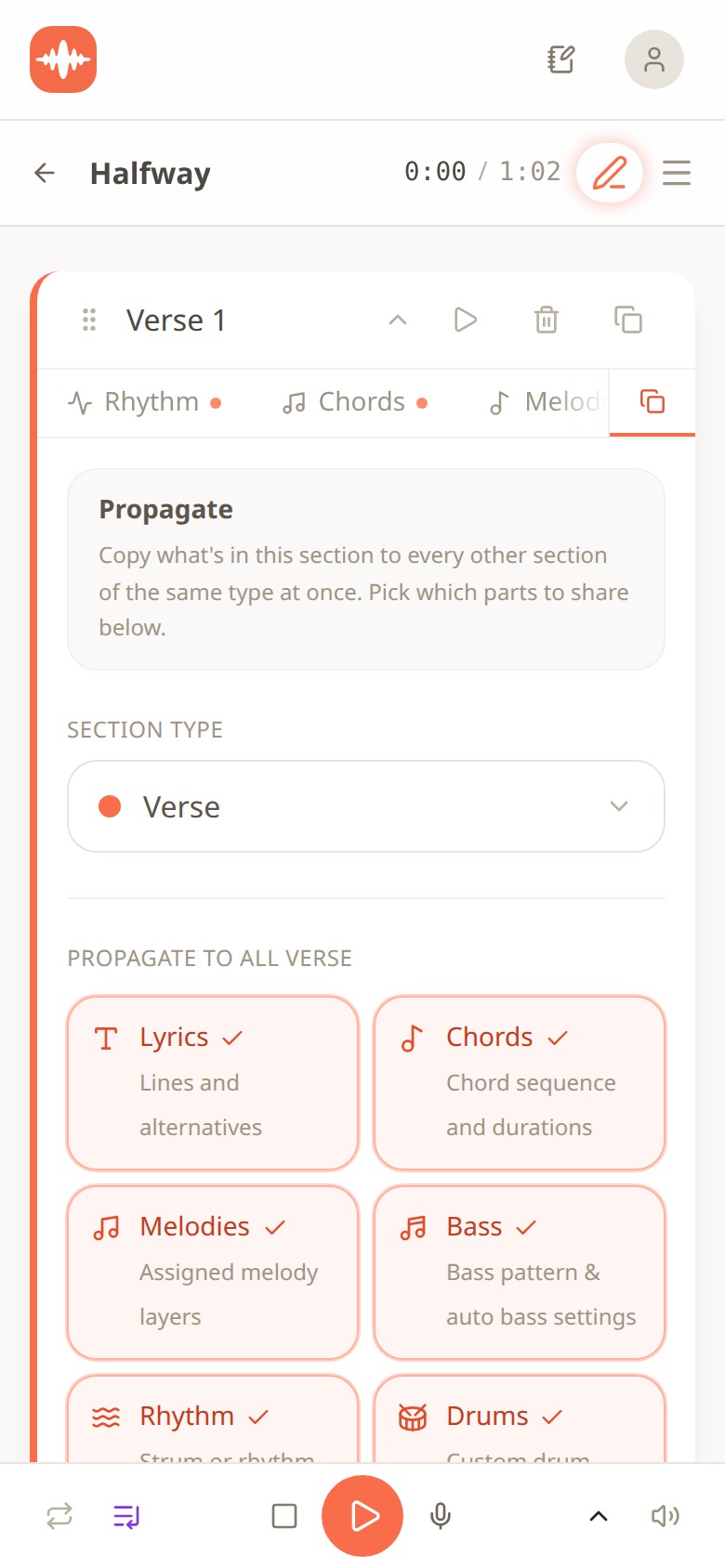
Melodoodle Propagate panel on Verse 1 with section type set to Verse and six tiles to copy: Lyrics, Chords, Melodies, Bass, Rhythm and Drums
Propagate copies what's in one section to every other section of the same type, at once. You pick which parts travel: Lyrics, Chords, Melodies, Bass, Rhythm, Drums. In the screenshot it's open on Verse 1 with all six ticked, which is exactly what you'd do on a chorus: set chords, strum, drums and words once on Chorus 1, propagate, and Chorus 2 and the final chorus match it to the word. Changed "still" to "always" later? Propagate again and there's one chorus in the song, not three cousins.
For verses you use the same panel differently. Untick Lyrics (verses are supposed to differ), maybe untick Melodies if verse two has its own variation, and keep Chords, Rhythm, Bass and Drums ticked so the band plays the same thing under every verse. A lyric change you make in verse two stays in verse two. That's the whole discipline, built into the tool instead of into your willpower.
Quick tip: propagate from Chorus 1 before you start recording takes. The teleprompter shows the current section's lines while you record, so if the choruses don't match yet, you'll be reading three scripts.
You don't have to build the structure yourself either. When you start a new song you get three options.
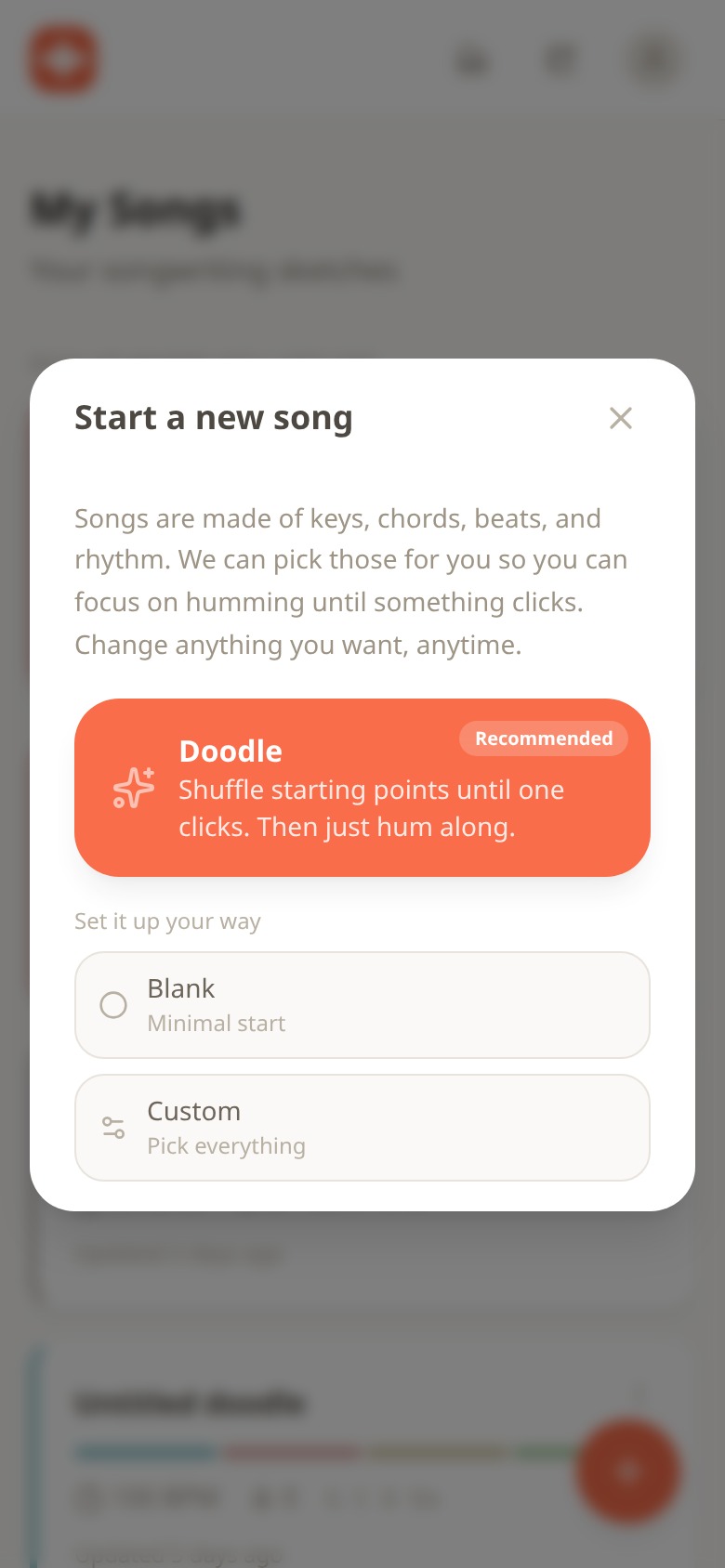
Melodoodle start a new song dialog with Doodle recommended, plus Blank and Custom options
Doodle (the one marked Recommended) shuffles a key, chords, beat and rhythm until one clicks, and you hum along until something sticks. Blank gives you a minimal start. Custom lets you pick everything, including a song structure template, so the verse, chorus and bridge cards already exist before you've written a word. Hum a melody into the Melody Creator and the pitch detector turns it into notes; write the words per section with rhyme suggestions and each line sitting over its chords.
The tagline is "Songs repeat themselves. So does this app." I'd read it literally rather than cleverly: the app's one structural idea is that repeated sections are the same section. Everything else (30 drum presets, 25 or more instruments, guitar tabs) is the sketchpad around that idea.
Three structures to steal
Here are three shapes that already work. Set them up as sections, fill the chorus once, propagate, and spend your energy on the verses.
1. The workhorse: Verse, Chorus, Verse, Chorus, Bridge, Chorus. Verse 1 sets the scene, who and where. Chorus states the point and carries the title. Verse 2 moves time or turns the situation. Chorus, identical. Bridge, eight bars on different chords, saying the one thing you've been holding back. Final chorus, identical, or repeated twice. Fits about 3 minutes at a pop tempo.
2. The runway: Intro, Verse, Pre-chorus, Chorus, Verse, Pre-chorus, Chorus, Bridge, Chorus, Outro. Use this when the verse and chorus feel too far apart. The pre-chorus is 2 to 4 lines, same words each time, rising toward the chorus. Intro is the chorus chords with no vocal. Outro is the hook fading or a single line repeated. In Melodoodle, pre-chorus is its own section type, so it propagates like a chorus.
3. The story-first: Verse, Verse, Chorus, Verse, Chorus, Chorus. The folk and country shape. Two verses before the first chorus buys you time to set up a story, and the chorus arrives as a payoff rather than a promise. No bridge; the doubled final chorus does that job. Works when the verses are the reason the song exists.
One rule for breaking them: break a repetition once, late, and on purpose. The final chorus can gain a line, drop the drums for four bars, or lift a key. The second chorus should not. If you can't say in one sentence what the listener gets from the change, it isn't a variation, it's a typo. In practice: propagate from Chorus 1 first, then make your one exception in the final chorus and leave it alone.
Free, in your browser, works offline
Melodoodle is free forever and fully functional: no walls, no account needed. A Pro tier adds voice effects (reverb, compression and equalizer presets), export to MP3, export to MIDI, and Publish and Share with an artist profile. The price is shown inside the app.
On Android it is on Google Play: https://play.google.com/store/apps/details?id=app.melodoodle.www.twa. On iPhone you install it from the browser, since it is not on the Apple App Store: open melodoodle.app in Safari, tap the Share button and choose Add to Home Screen. On a desktop in Chrome or Edge use the install icon in the address bar; on macOS Safari, File then Add to Dock. Once installed it works offline, and the sounds are pre-built, so they download in seconds.
The interface is in English and Spanish, rhyme suggestions work in both languages, and chords can be shown as letters (C, Am, F) or solfège (Do, Lam, Fa). Current version is 0.28.0 (July 2026). The site that explains it all lives at https://melodoodle.io.
Next step, if you want one: take the song with the three choruses, pick the best one, and paste it into a single chorus card. Propagate. Then read the two verses and ask whether verse two actually moves the story. That question is where the real writing is.
Questions people also ask
Should the second chorus be exactly the same as the first?
Yes, as the default. The second hearing is where the listener recognises the hook, and any change spends their attention on the difference. Save variations for the final chorus, and make one, not three.
What's the difference between a bridge and a pre-chorus?
A pre-chorus repeats every time and sits between verse and chorus to build tension. A bridge appears once, after the second chorus, on different chords, to give the final chorus something to return from.
Do I need a bridge at all?
No. Plenty of songs replace it with an instrumental section, a stripped-down chorus, or simply a doubled final chorus. You need contrast before the last chorus; a bridge is one way to get it.
How long should a chorus be?
Eight bars is the common length, sometimes sixteen. If your chorus is four lines and the title appears at least once, you're in the normal range.
Does Melodoodle need an account or an internet connection?
No account. Get it from Google Play on Android, or on iPhone open melodoodle.app in Safari and add it to your home screen; it works offline from then on. It's free and fully functional; Pro adds effects, MP3 and MIDI export, and publishing.

Pablo Dominguez
Full Stack Developer passionate about building interesting projects and learning new skills.