
Eight reads of every line. Eighty-eight lines. One hour-long WAV. You know the moment: the session went well, the director was happy, and now you're sitting in front of a timeline that looks like a mountain range, scrolling and hunting for the read you remember being good. Sounds familiar?
Here's the short answer to the question in the title: don't try to pick the best take in one decision. Run a funnel of passes. First pass, keep or drop each take on instinct while it plays. Second pass, hear the survivors of one line back to back and drop the weaker ones. Final pass, one take per line. The choice becomes obvious when a line's takes play consecutively, and a count per line keeps you honest about what you've actually got. The part that hurts is not the choosing. It's the mechanical work around it: finding each take, knowing which line it belongs to, moving it to the next track.
That mechanical part is what Takekeeper does. It's a free tool I built that runs in a desktop browser (Chrome or Edge for the full set), cuts the session into takes at the silences, and gives you lanes for the passes. Nothing is uploaded: the recording is read from disk inside the browser, and exports are written back to disk. The interface is in English and Spanish. But before the tool, let me teach the method, because it works in any DAW too.
Selection is a funnel, not one decision
When a colleague tells me they scroll the timeline looking for "the good one", I ask them a question: good compared to what? A take on its own is hard to judge. Was that read a little flat, or is that exactly the tone the scene wants? You can't tell until you hear the alternatives. Quality is comparative, and one decision per line forces you to hold eight reads in your head at once.
So split the job into three passes that each ask a smaller question.
First pass: keep or drop. Takes play one after another. You don't stop, you don't rewind, you don't compare. If the read is usable, keep it. If it's a fluff, a slate, a cough, or a read you'd never send, drop it. Instinct is enough here because the question is binary and forgiving: a keep that shouldn't have been kept costs you two seconds later, a drop that shouldn't have been dropped is rare when you're only removing the obvious ones.
Second pass: compare the survivors of one line. Now you hear only the keeps for line 13, back to back, and you drop the weaker half. This is where taste comes in, and it's a lot easier when the alternatives are thirty seconds apart instead of scattered over an hour.
Final pass: one take per line. Two or three left for each line. Pick one. If two are genuinely equal, keep both and let the director decide (don't get me wrong, that's a legitimate outcome, not a failure).
The creative part of take selection is maybe half an hour of listening. Everything else is bookkeeping.- Pablo Domínguez
Why back to back beats scrolling
Ever noticed how a take sounds fine until you hear the next one? That's not indecision, that's how ears work. Your memory of a read fades in seconds. When take 3 and take 7 of the same line are separated by forty minutes of recording, you're comparing a sound to a memory of a sound. When they play consecutively, you're comparing a sound to a sound. The choice stops being a judgment call and becomes obvious.
This is the single most useful thing you can do in any tool: get all the takes of one line lined up so they play in a row. In a DAW that means cutting, labelling and gathering them. In Takekeeper that's what line mode does, and we'll get there.
Counts per line keep you honest
I get that counting sounds like a tedious detail. But here's the trick: the count is what catches the line you forgot. When you're dropping on instinct, it's easy to trash every read of a short line ("Dos chicles." gets cut close to a breath, it sounds like a false start, gone). If you only find out when the client asks where line 15 went, you're reopening the session a week later.
A per-line count answers three questions before the session ends: which lines have nothing kept, which lines still have eight takes in the pile (you skipped them), and which lines have one, meaning your decision is already made. If you're doing this by hand, a column in a spreadsheet next to the script works. It's clumsy, but it's better than trusting your memory of 88 lines.
The part that eats the afternoon
Now, let's talk about where the time actually goes. Listening to an hour of takes once takes an hour. Listening to the survivors again takes maybe fifteen minutes. That's not the afternoon.
The afternoon is: zooming into the waveform to find where a take starts, cutting at the silence, listening to confirm which line it is, naming the region, dragging it to the keeper track, realizing the previous cut swallowed a breath, undoing, doing it again. Multiply by 800. None of that is a decision. It's the same three moves repeated until your hand hurts, and every one of them interrupts the listening that is the actual job.
Takekeeper started as a Python script that did exactly one of those moves (cut the file at the silences into numbered pieces) for a voice actor who then arranged the pieces across several audio tracks in FL Studio. The lane workflow below is a copy of what she did by hand.
How Takekeeper runs the funnel
You drop the WAV on the page. It's streamed, never decoded whole: the level of every 20 ms frame is measured, and wherever it stays under a threshold (default -40 dBFS) for longer than the minimum silence (default 1.0 s) it cuts, leaving a 0.25 s margin of room tone on both sides. Each take is a start and end position, not a copy, so an hour-long 1.2 GB session loads in about six seconds. Then you paste the script as plain text, pick your character from the list it finds, and you're sorting.
Lanes are the passes. Unsorted, Pass 1, Pass 2, Final, plus Junk and Trash (names and number of passes are configurable). You sit in a lane and takes autoplay one after another. Enter promotes the current take to the next lane. Backspace trashes it. Doing nothing leaves it where it is. Tab switches lanes. When Unsorted is empty you move to Pass 1 and do it again, and you keep going until Final holds one take per line.
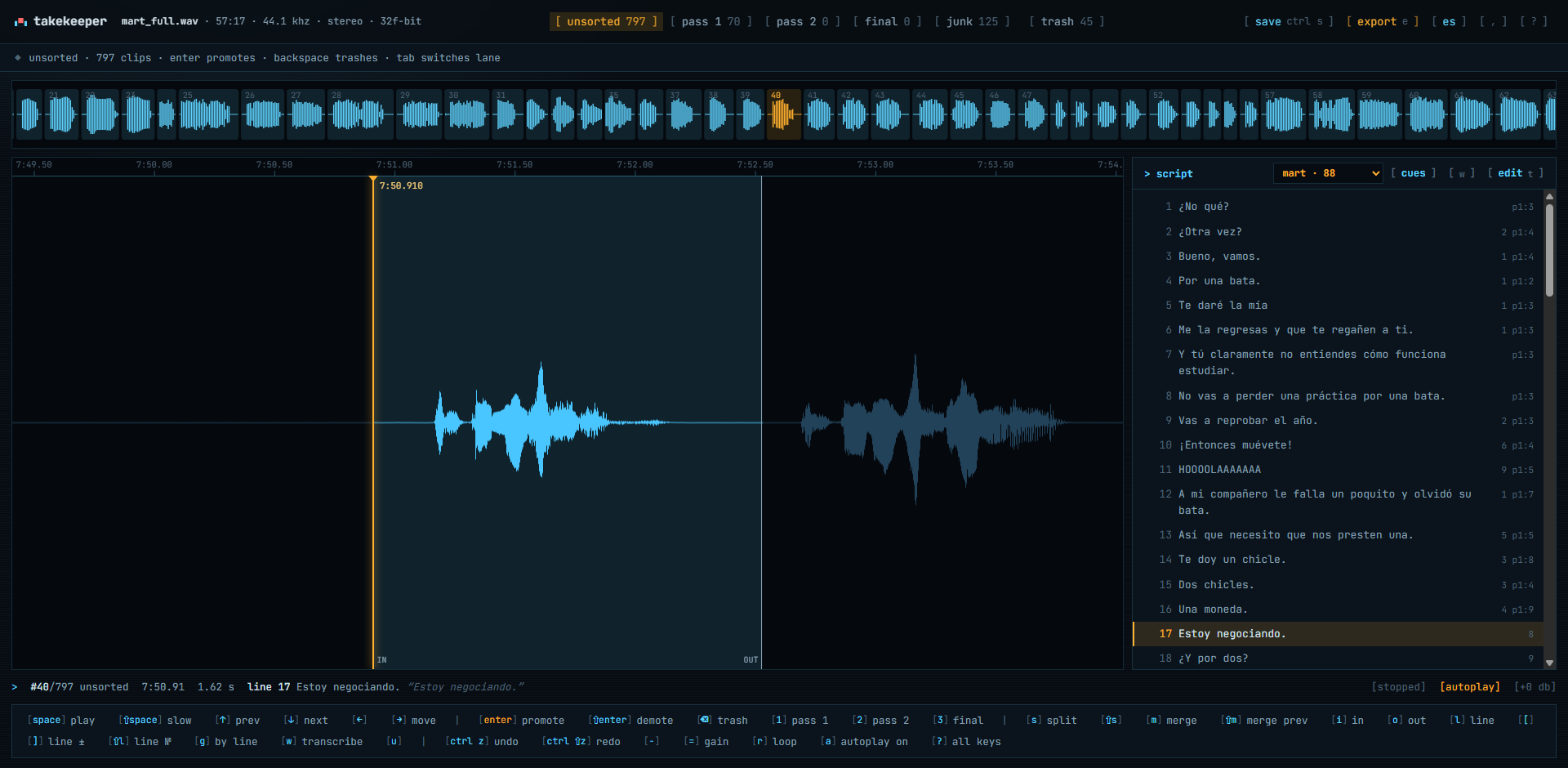
Takekeeper mid-sort: lane tabs with counts along the top, a strip of takes, the current take's waveform with an amber playhead, and the script panel with per-line counts
This is what the first pass looks like partway through. The tabs across the top read the counts out loud: 797 still unsorted, 70 already promoted to Pass 1, 125 in Junk, 45 in Trash. The strip shows the takes as small waveforms, take 40 highlighted in amber, and the big waveform below is that take with the playhead at 7:50.910, its in and out points visible and the neighbouring audio greyed out on the right. The status line at the bottom says it's 1.62 seconds long and belongs to line 17, "Estoy negociando." The script panel on the right shows every line with a small count next to it. You never have to ask which line you're hearing.
Line mode (press G) filters the lane to one script line so its takes play back to back. This is the second pass.
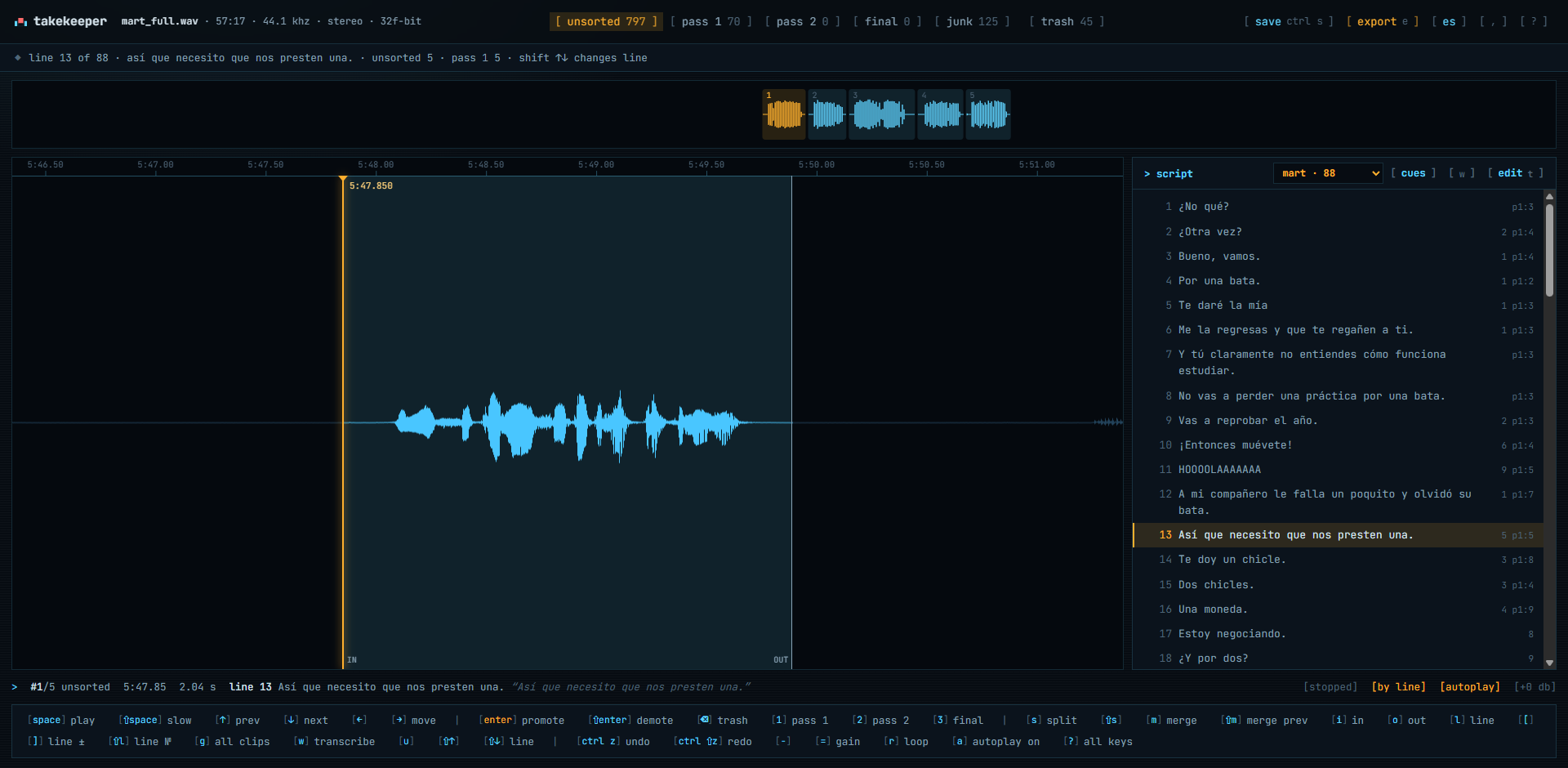
Takekeeper in line mode on line 13: five takes in the strip, a banner showing the line's counts per lane, and per-line counts in the script panel
Here I'm on line 13 of 88, "Así que necesito que nos presten una." The strip shrinks to its five takes, the banner shows how many of them sit in each lane, and Shift with the up and down arrows steps to the previous or next line. Five reads of the same sentence in about ten seconds: you'll hear which one has the right weight on necesito without thinking about it. In the script panel, line 13 is highlighted and each line carries its own counts, so a line with nothing left anywhere is marked and stands out before you export.
Two honest caveats. The Junk lane is the app's guess, not Trash: it catches breaths, slates and false starts that never reached a word, and it never takes a line's last remaining take, but short real lines sometimes land there, so give it a quick scroll. And when a cut lands wrong, you fix it by hand: every take shows 1.5 s of context on each side, I and O set start and end, S splits, M merges with the next take and restores the audio between, Shift+Space replays in slow motion, R loops, undo is unlimited.
Everything above can be driven entirely from the keyboard and is tuned for that: Space, Enter, Backspace, arrows, Tab. Every key is also a toolbar button, so if you prefer the mouse you can click lanes, takes, the waveform and script lines and get the same result.
Transcription (Whisper running on your own GPU, optional, about ten minutes of processing per hour of audio on a mid-range PC) matches every take to its script line automatically and improves the cuts. That's the next post. Without it, you mark the script by hand: press L on a take to say "the script continues here", and the takes that follow attach to the following lines. The script panel and transcription are tuned for both English and Spanish, and so is the interface.
The net effect: a session that used to be an afternoon of dragging becomes about half an hour of listening. The Final lane exports into a folder, a zip, or one merged WAV, numbered in script order once takes have lines, with silent spacer files between takes so a Shift-drop onto the FL Studio playlist lands everything on one track in order. On the reference session, 848 files were built in 0.7 seconds.
Quick tip: lanes, cuts, line marks and position save in the browser as you work, so you can stop after the first pass and pick up tomorrow from the landing page. Ctrl+S writes a small .takekeeper.json next to the recording if you want to continue on another machine.
The three-pass routine, as a checklist
- Load the WAV, paste the script, pick your character. Check the cut count looks sane for the session length.
- Glance through Junk for short real lines that got caught, promote any you find.
- Pass 1, in Unsorted with autoplay on: Enter keeps, Backspace drops, never rewind. Do the whole file in one sitting.
- Check the script panel: any line marked empty? Go back to Trash or Junk and rescue a take for it.
- Pass 2, in Pass 1 lane with line mode on: hear each line's survivors back to back, promote the better half, Shift+arrow to the next line.
- Final pass, in Pass 2 lane, still in line mode: one take per line to Final. Two if they're genuinely equal.
- Fix any cut that bothers you (I, O, S, M) before exporting, then export Final to a folder and drop it on the DAW.
Print that, or don't. After two sessions it's muscle memory, and the interesting part of the job, the listening, is all that's left.
Questions people also ask
Does my recording get uploaded anywhere? No. There's no account and no server. The WAV is read from disk inside the browser and exports are written back to disk. The only network traffic is loading the app itself (and, if you choose transcription, the one-time model download).
Can I use it without a script? Yes. Silence detection and the lanes work on any file. You just lose the per-line counts and line mode, unless you mark the script by hand with L or paste a plain list of lines without character names.
What if a cut lands in the middle of a take? Every take shows 1.5 s of context on each side, so you set the start and end with I and O, split with S or merge with M, and replay in slow motion with Shift+Space to check. Undo is unlimited. Transcription also re-cuts takes that contain several reads, but that's optional.
Does it work in Firefox, or on my iPad? Firefox sorts fine and downloads a zip instead of writing into a folder; transcription there runs on the CPU and is slow. Chrome or Edge on a desktop get everything. Phones and tablets aren't the target.
Do I have to use the keyboard? No. The app is tuned for the keyboard because it's faster while you listen, but every key is also a toolbar button, and you can click lanes, takes, the waveform and script lines with the mouse.
If you've got a session routine of your own, or a line in this method you disagree with, tell me in the comments. I'd like to hear how other actors do the second pass.

Pablo Dominguez
Full Stack Developer passionate about building interesting projects and learning new skills.