
The short answer
For most of my twenties I had this exact problem. I could hear a full song in my head, melody and words together, and the moment I tried to record it there was nothing under my voice. No chords, no beat, just me humming into a phone. Sounds familiar? The good news is that the part you are missing is much smaller than it feels. A song's harmony is a handful of chords in one key, and most songs you know use four of them. You do not need to play those chords. You need to choose them, and then hear them.
Here is how I do it today: I open Melodoodle, a web app you install from Google Play on Android or from the browser on iPhone, tap four chords that belong to one key, pick a strum pattern and a drum preset, press play, and sing over the loop until the words land. It's free, it needs no account, and a sampled real piano is under your voice from the first tap. But before I show you the app, let me explain the idea properly, because you'll write better songs if you understand what you're picking.
What a key is, and why four chords carry most songs
Think of a key as a home base. When a song is in the key of C, the note C feels like home, and there are seven notes that live comfortably around it (C, D, E, F, G, A, B). Every one of those seven notes can be turned into a chord, so a key gives you seven chords that all sound like they belong together. That's the whole trick. Stay inside those seven and almost any order you pick will sound like music instead of noise.
Musicians number those chords with Roman numerals so the pattern works in any key. In C, the numbers look like this:
- I is C (home, the most stable chord)
- V is G (pulls you back toward home)
- vi is Am (the same notes as home, but sad)
- IV is F (open, lifts away from home)
Put them in the order I, V, vi, IV and you get C, G, Am, F. You have heard this flow hundreds of times without knowing it. Why does it work so often? Because it tells a tiny story in four steps: you're home, you lean away, you turn a little sad, you open up, and then you're home again. Your ear expects the return, and the expectation is what makes a chorus feel like a chorus. Swap the order to vi, IV, I, V (Am, F, C, G) and the same four chords sound darker, because you're starting from the sad one.
Songs repeat themselves. That is not a flaw. It is why you can sing along the second time you hear one.- Pablo Domínguez
Now, let's talk about the part singers underestimate: rhythm matters as much as the chords. The same C, G, Am, F played as slow held notes is a ballad. Played with a fast down-up strum and a driving kick drum it's a rock song. Played over a syncopated bass line it's something you could dance to. Three things build that feel: the strum pattern (how the chord is hit across a bar), the drums (the pulse you tap your foot to), and the bass (the low note that anchors each chord). Chords tell the ear where it is. Rhythm tells the body what to do.
I get that this can sound like a lot of theory when all you wanted was to record a chorus. So here's the thing I want you to take away: you do not need to play any of this to choose it. You don't need to be a chef to pick a menu. You need to know that there are four dishes that go well together, taste them, and decide which one comes first. Choosing chords is the same. Hearing them used to be the hard part, and that's the part that got solved.
How this works in Melodoodle
Melodoodle is a songwriting sketchpad I built because I'm a singer, not a guitarist, and I was tired of losing ideas while I waited for someone with an instrument. A song in it is made of sections (verse, chorus, bridge, outro), and each section holds its own chords, rhythm, melody layer, lyrics and recorded takes. You can start from a structure template or let Doodle mode shuffle a key, chords, beat and rhythm until one clicks. Here's what the four choices from the theory above look like on screen.
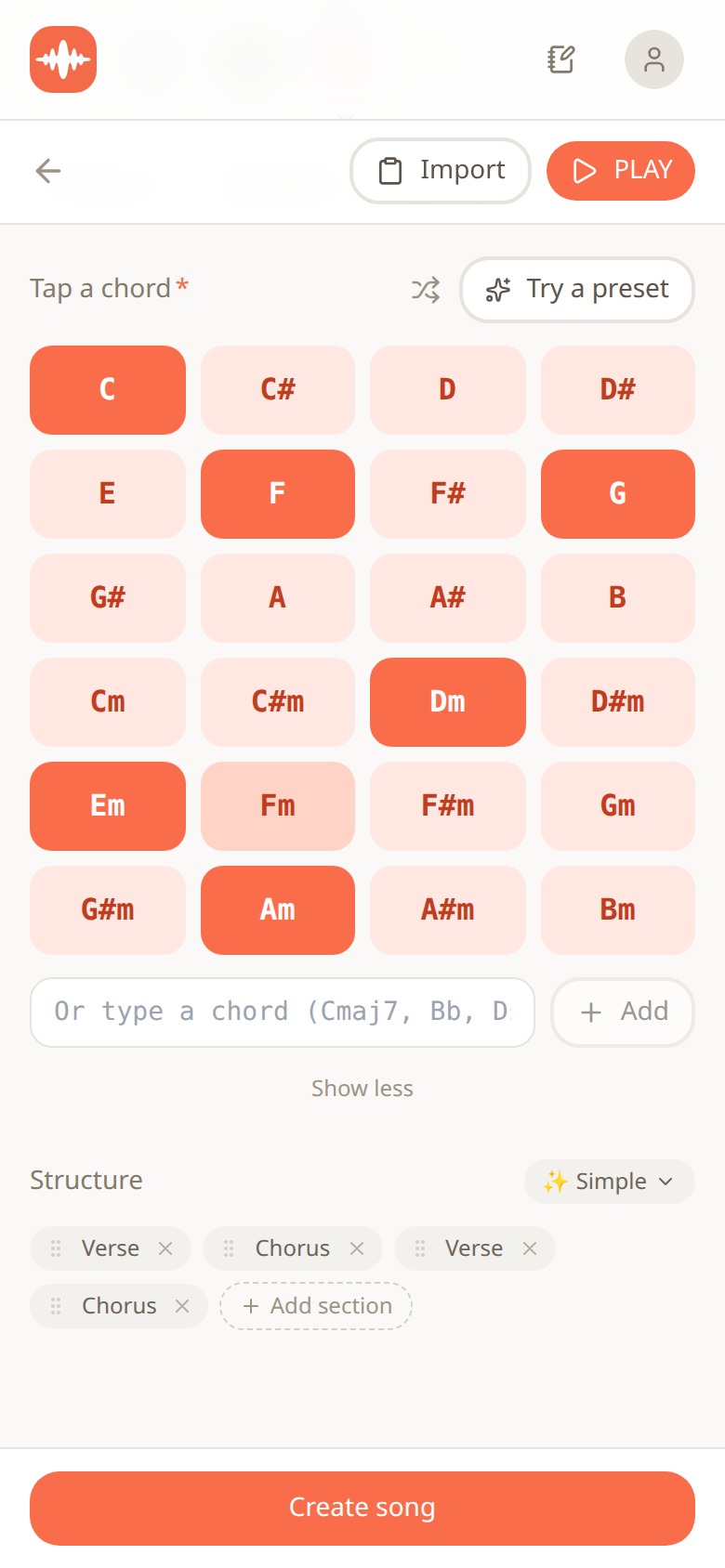
Melodoodle chord picker with the six chords of the key of C highlighted and a verse-chorus structure underneath
This is the chord picker. The grid shows every major and minor chord, and the key hint lights up the ones that belong to the key you're in. In the screenshot the song is in C, so C, F, G, Dm, Em and Am are highlighted and everything else is greyed back. Tap them in the order you want and they become your chord flow. If you'd rather not think, the Try a preset button hands you a flow like I, V, vi, IV ready to go. Chord names can show as letters (C, Am, F) or as solfège (Do, Lam, Fa), which matters if you learned music in Spanish or Italian. Under the picker you set the structure: Verse, Chorus, Verse, Chorus, and add a bridge or outro when you need one.
Quick tip: if a flow sounds good but sits too high or too low for your voice, use transpose. Two taps move the whole song into another key and every section follows. You keep the shape of the story (I, V, vi, IV stays I, V, vi, IV) and only the pitch changes. Singers should do this before writing a single lyric, because a chorus you can't reach is a chorus you'll never finish.
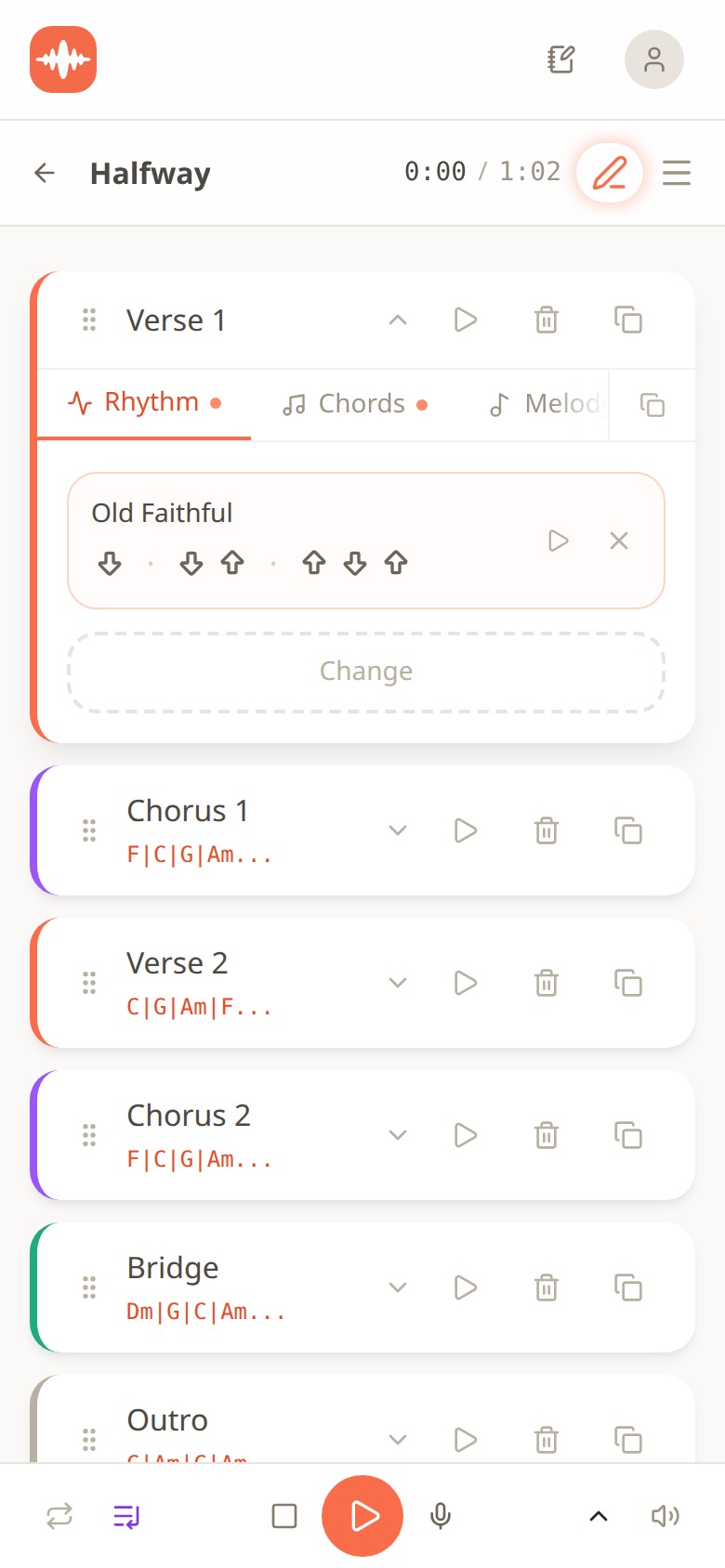
Verse 1 section open on the Rhythm tab showing the Old Faithful strum pattern, with Chorus, Verse 2, Bridge and Outro sections below
Now the rhythm. Each section has a Rhythm tab where you assign a strum pattern. Here Verse 1 of a sketch called Halfway is using Old Faithful, and you can read the pattern from the arrows: down, down-up, up-down-up. That single pattern is behind an enormous number of acoustic songs. Driving Rock is another preset, and the feel changes completely with the same chords. Below the open section you can see the rest of the song stacked up with its chord flows written out: the chorus on F, C, G, Am, the verse on C, G, Am, F, the bridge on Dm, G, C, Am. Same key, different orders, different jobs.
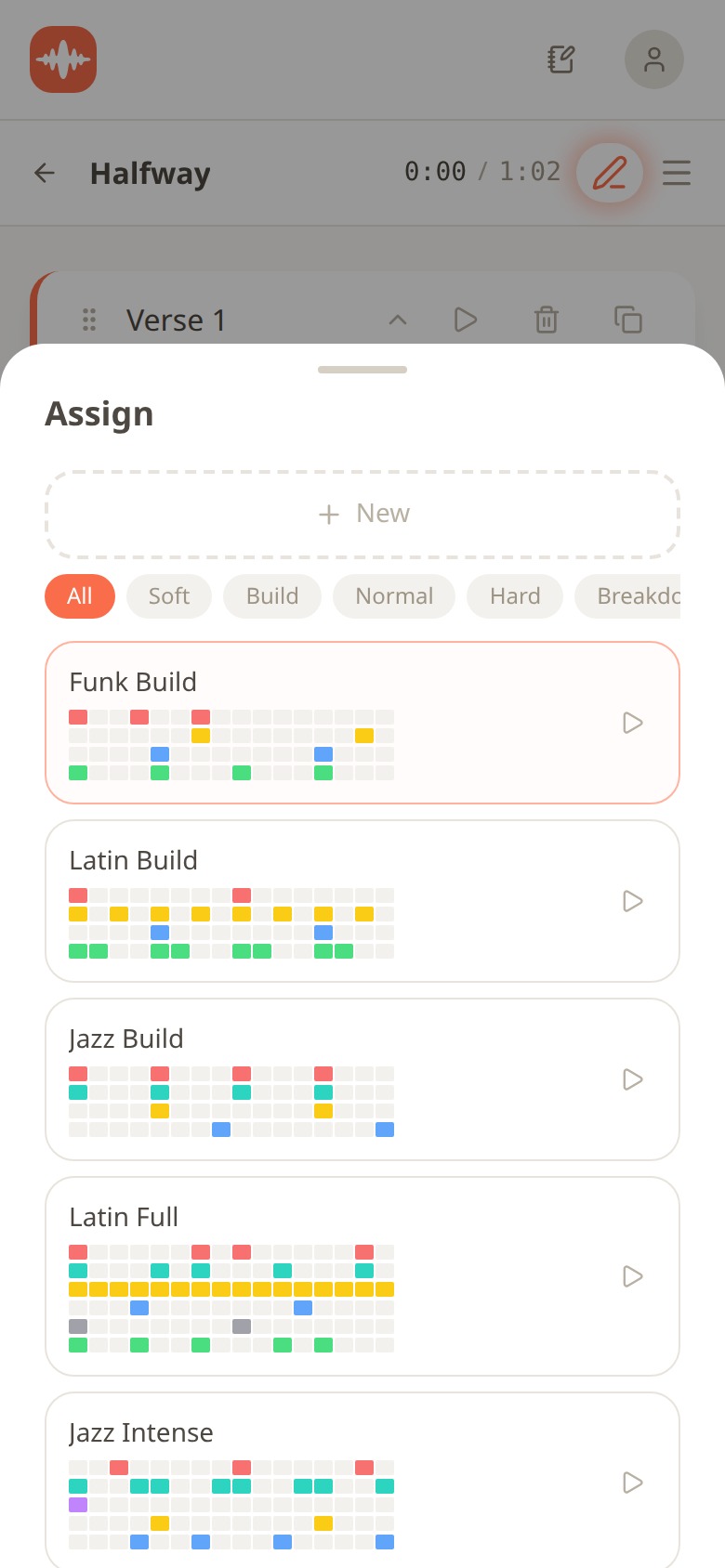
Drum preset assignment sheet listing Funk Build, Latin Build, Jazz Build, Latin Full and Jazz Intense with intensity filters
Drums come from 30 presets across pop, rock, jazz, latin, electronic and hip hop, and you assign one per section. The filters along the top (Soft, Build, Normal, Hard, Breakdown) sort them by intensity, which is exactly how you'd think about a song: a verse wants something held back, a chorus wants the full kit. In the screenshot Funk Build is selected, with Latin Build, Jazz Build, Latin Full and Jazz Intense underneath, and each one shows its pattern as a grid so you can see where the kick and snare fall before you press play. The drum sounds are real recordings, not synthesized on the fly. An automatic bass line follows your chords, so you never have to think about the low end at all.
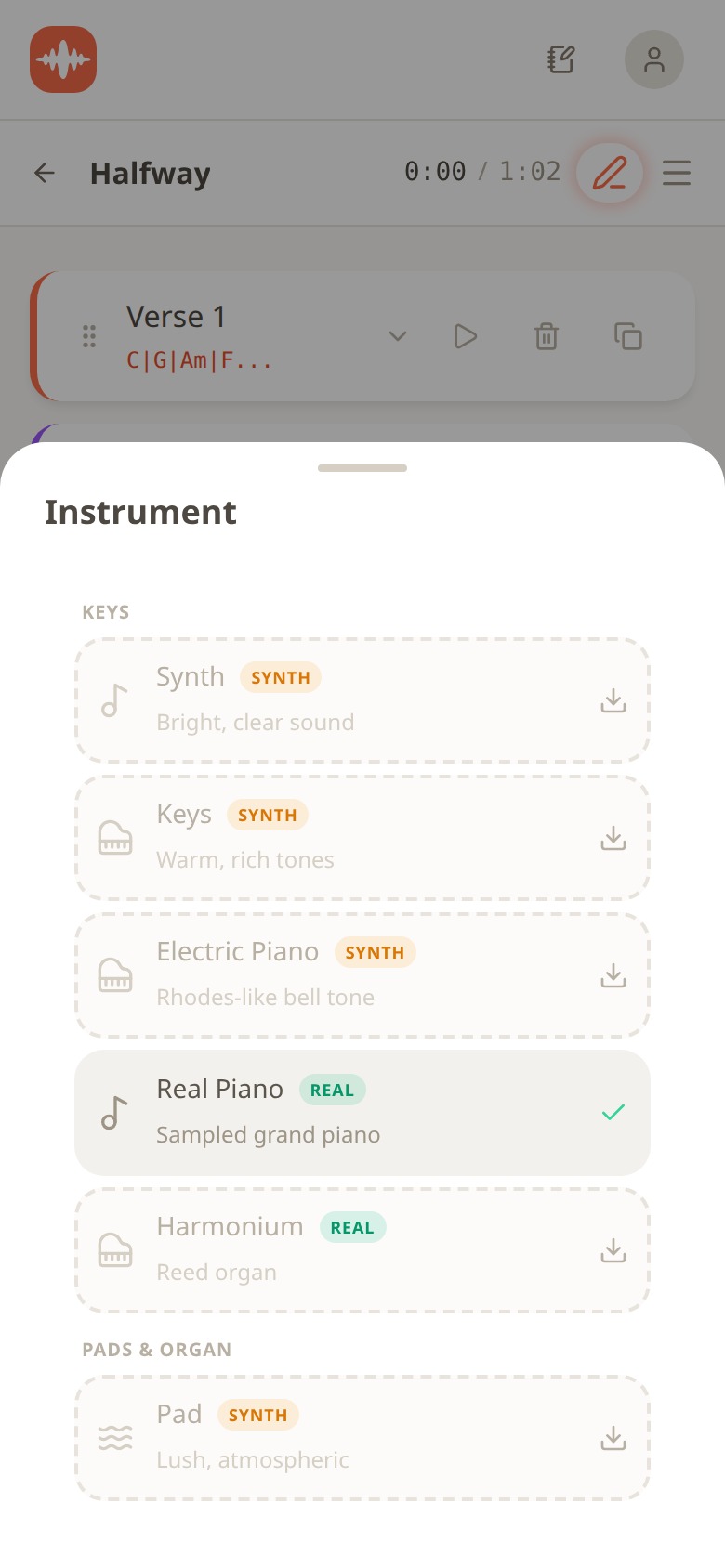
Instrument selection sheet with Real Piano selected, alongside Harmonium, Electric Piano, Keys, Synth and Pad options
Last choice: what plays the chords. There are 25 or more instruments, and the one selected here is Real Piano, a sampled grand piano. Harmonium is also a real recording, and then you have Electric Piano with a Rhodes-like tone, warm Keys, a bright Synth and a lush Pad. The little download arrows next to the unused ones tell you something important: every sound is pre-built and downloads in seconds. Nothing waits to be rendered. Tap Real Piano, and a real piano is under your voice.
Then you press play and sing. The section loops, so you can hum the same eight bars twenty times while the words find their places. When something sticks, you record a take right there, with a teleprompter showing the current lines, and you can keep several takes and layer them for harmonies. Lyrics live per section with each line aligned to the chord under it, and rhyme suggestions work in English and in Spanish. And for the day you hand the song to someone who does play: guitar tab generation turns your chord flow into something a guitarist can read and play in a minute.
A sketch you can sing, not a finished record
Let me be honest about what you get. This is a sketch: a loop with real instruments, your voice on top, structured into sections, in a key you can sing. It's enough to share with a friend, a bandmate or a producer and have them understand the song completely. It is not a finished record. Mixing, arrangement, a real drummer or a polished vocal chain are a different job, and Melodoodle doesn't pretend to do it. The point is to capture the idea before it escapes, with enough structure to develop it later, either inside the app or in a DAW. Don't get me wrong, that's the hardest part of songwriting for most singers, and it's the part that was missing.
Here's the process I'd follow this week if I were you:
- Pick a key you can sing in. Hum your melody, find the lowest and highest notes, and transpose until both feel comfortable.
- Choose four chords from the key hint. Start with I, V, vi, IV. Change the order only if the mood is wrong.
- Choose a rhythm. One strum pattern, one drum preset filtered by the intensity your section needs. Let the bass follow.
- Loop one section. Not the whole song. One verse or one chorus, on repeat.
- Hum until words come. Record the take the moment a line lands, then move to the next section.
After a week of doing this you'll notice something: you start hearing the chords in your head before you tap them. That's the theory becoming instinct, and it happens faster when you're choosing from a menu than when you're fighting with fingering.
Installing it, and what's free
Melodoodle is free forever, fully functional, with no account needed. On Android you get it from Google Play. On iPhone it's not on the Apple App Store, so you install it from the browser: open melodoodle.app in Safari, tap the Share button, then Add to Home Screen. On a desktop in Chrome or Edge use the install icon in the address bar, and on macOS Safari go to File, then Add to Dock. Once installed it works offline, which matters when a melody shows up on a plane or in a basement rehearsal room.
The interface is in English and Spanish, and rhyme suggestions work in both. A Pro tier adds voice effects (reverb, compression and equalizer presets), export to MP3, export to MIDI, and Publish and Share with an artist profile. The Pro price is shown inside the app. Everything I described above, from the chord picker to guitar tabs to recording takes, is in the free version. The current release is 0.28.0, and you can read more about how it's built at melodoodle.io.
Questions people also ask
Can I write a song with just my voice?
Yes. Melody and lyrics are the song; chords and rhythm are the setting. You can write the whole thing by humming, and then choose the chords that fit underneath rather than playing them.
What are the four chords most songs use?
I, V, vi and IV. In the key of C that's C, G, Am and F. Move to another key and the letters change but the relationship, and the feeling, stays the same.
Do I need to learn music theory to write a song?
No, but knowing what a key is and how a four-chord flow works will make your choices faster. Everything in this post is the theory you need to start; the rest you pick up by listening to your own loops.
How do I find the right key for my voice?
Hum your melody and notice where it strains at the top or disappears at the bottom. Then transpose the whole song up or down until both ends feel easy. In Melodoodle that's two taps and every section follows.
Can a guitarist play what I made if I don't read music?
Yes. Melodoodle generates guitar tabs from your chord flow, so you hand over a sheet that shows exactly which chords, in which order, for each section.
If you've been carrying melodies around with nowhere to put them, try the five steps above with one chorus and tell me in the comments how it went. I'd love to hear what came out.

Pablo Dominguez
Full Stack Developer passionate about building interesting projects and learning new skills.