
The short answer
Yes, and it doesn't require trusting anyone with the file. Speech recognition can now run inside a desktop browser on your own graphics card, which means a tool can listen to every take, read your script, and pair them up while the recording stays on your disk. The only thing that travels over the network is the app itself and a one-time model download.
The tool I built for this is Takekeeper. It's free, it runs in Chrome or Edge on a desktop, there's no account and no server, and the recording is never uploaded. You drop a WAV on the page, paste the script, press W, and roughly ten minutes of processing per hour of audio later every take knows which line it belongs to. But I'd rather you understood the idea first, because the idea is what makes the privacy claim checkable rather than a promise on a landing page.
Sounds familiar? You've got a 57 minute session for one character, 800 or so takes, the same line read three, five, eight times with a breath or a slate in between, a couple of places where the director went back two lines and redid them. The script is under NDA. The studio's rule is simple: unreleased audio does not go to third-party servers. So the usual "upload and we'll transcribe it" services are off the table before you even read their terms.
How speech recognition ended up on your graphics card
Two things changed in the last couple of years. First, OpenAI released Whisper, a speech recognition model that's small enough to ship as a file: the small variant is about 410 MB, the base variant about 140 MB. Second, browsers gained WebGPU, a way for a web page to run heavy math on the graphics card. Put them together with a library like transformers.js and a web page can download the model once, cache it, and run it locally on your GPU. No installer, no Python environment, no cloud.
Now, let's talk about the part most people get wrong. The obvious approach is to transcribe the whole hour in one go and then search the transcript for each line. It doesn't work well, and the reason is repetition. A long pass hears "So I need someone to lend us one" eight times in a row with breaths between, and a model trained on normal speech starts to lose its place: it merges reads, drops some, hallucinates connecting words. Transcribing each take on its own sidesteps that entirely. Every take is a short, self-contained clip, the model gets one read at a time, and you get one clean text per take.
Then comes matching, and here's the trick: don't judge each take alone. A transcript with a couple of misheard words might sit equally close to two similar lines. But a session is recorded in order, with detours. So the matcher does a single pass over the whole session and prefers staying on the current line or moving to the next one, only jumping when the text strongly says so. A recording that goes 12, 13, 14, back to 12, 13, then on to 15 matches correctly because the matcher is following the same path the director walked. On the reference session, the recording contained 15 backward moves and 4 large jumps, and all 88 lines still received their takes.
What's a doubtful match? A take whose transcript isn't close enough to its assigned line to be trusted, or one where the sequence and the text disagree. Instead of silently guessing, those get flagged, and you walk through them by hand. I get that a flagged list sounds like homework, but it's a short list, and it's exactly the list a careful person would want to see.
What the transcript is good for beyond matching
Cutting a session at the silences is already good. Wherever the level stays under a threshold (default -40 dBFS) for longer than a second, cut, keep a bit of room tone on each side, leave short breaths inside a take alone. Most sessions come out right with nothing else. Transcription is an optional second pass on top of that, and once you have a text for each take, three things become possible that silence alone can't do:
- A take that holds several reads with no real pause between them gets re-cut into single reads, because the text shows the line starting over.
- A false start followed by the real read gets separated at the point where the words restart.
- A line that a long pause split in two gets merged back, because neither half is a whole line and together they are.
Two honest limits. Transcription judges what a take is, never how good it is. It'll tell you a clip is line 13; it has no opinion on whether it's the best line 13. And Whisper is tuned for clean booth speech. Shouted, laughed or mumbled lines transcribe poorly, and they show up as flagged matches rather than confident wrong ones. That's the behaviour you want, but it does mean an action-heavy session will hand you more flags than a quiet drama.
The model is a very fast, very literal assistant. It's brilliant at 'which line is this' and useless at 'which one should I keep'. Keep those two jobs separate and it stops feeling like a black box.- Pablo Domínguez
Running it in Takekeeper
Here's the whole workflow, step by step:
- Drop the WAV on the page. It's streamed, not decoded whole, so a 1.2 GB hour loads in about six seconds and uses about 35 MB of memory.
- Paste the script as plain text. Rows like "Name: text" are spoken lines, everything else becomes stage direction. Pick your character from the list; "line 14" now means your 14th line.
- Press W. Choose Spanish or English (or auto), and pick a model: small is the safe choice for Spanish, base is roughly twice as fast and a little rougher.
- Wait. Budget about ten minutes per hour of audio on a mid-range PC, longer on weaker machines. On an NVIDIA GPU the 57 minute reference session took about twelve minutes with the small model.
- Press U to walk through doubtful matches, then glance at Junk (more on that below).
This is what the dialog looks like mid-run. Spanish selected, the small model, running on WebGPU with an NVIDIA card, 15 of 1037 takes done and about 18 minutes left. Notice the line at the top of the dialog: the model downloads once and is cached, and your audio never leaves the machine. That's not marketing copy, it's a description of where the computation happens.
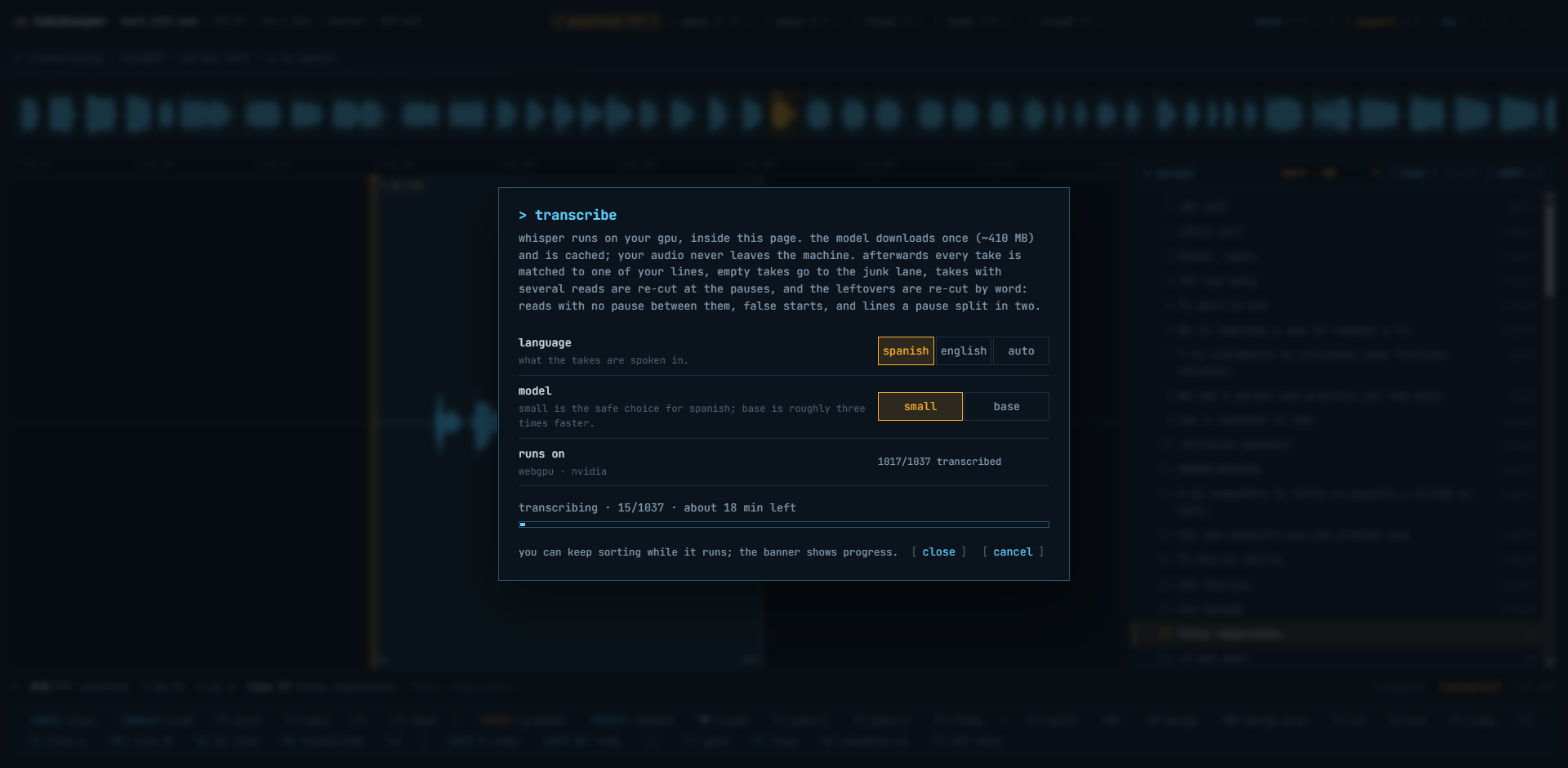
Takekeeper transcription dialog mid-run: Spanish, small model, running on WebGPU with an NVIDIA GPU, 15 of 1037 takes transcribed, about 18 minutes left
Quick tip: don't plan on doing other heavy work while it runs. The GPU is busy, and the estimate assumes it has the card to itself. Make a coffee instead.
When it finishes, the script panel turns into a map. Every line shows how many takes it has and in which lane. Below, line 13 ("Así que necesito que nos presten una.") is filtered in line mode so its five takes play back to back, the banner reads unsorted 5, and the transcript of the selected take sits in the status bar matching the script text word for word. Shift plus the arrow keys moves to the next line without leaving line mode.
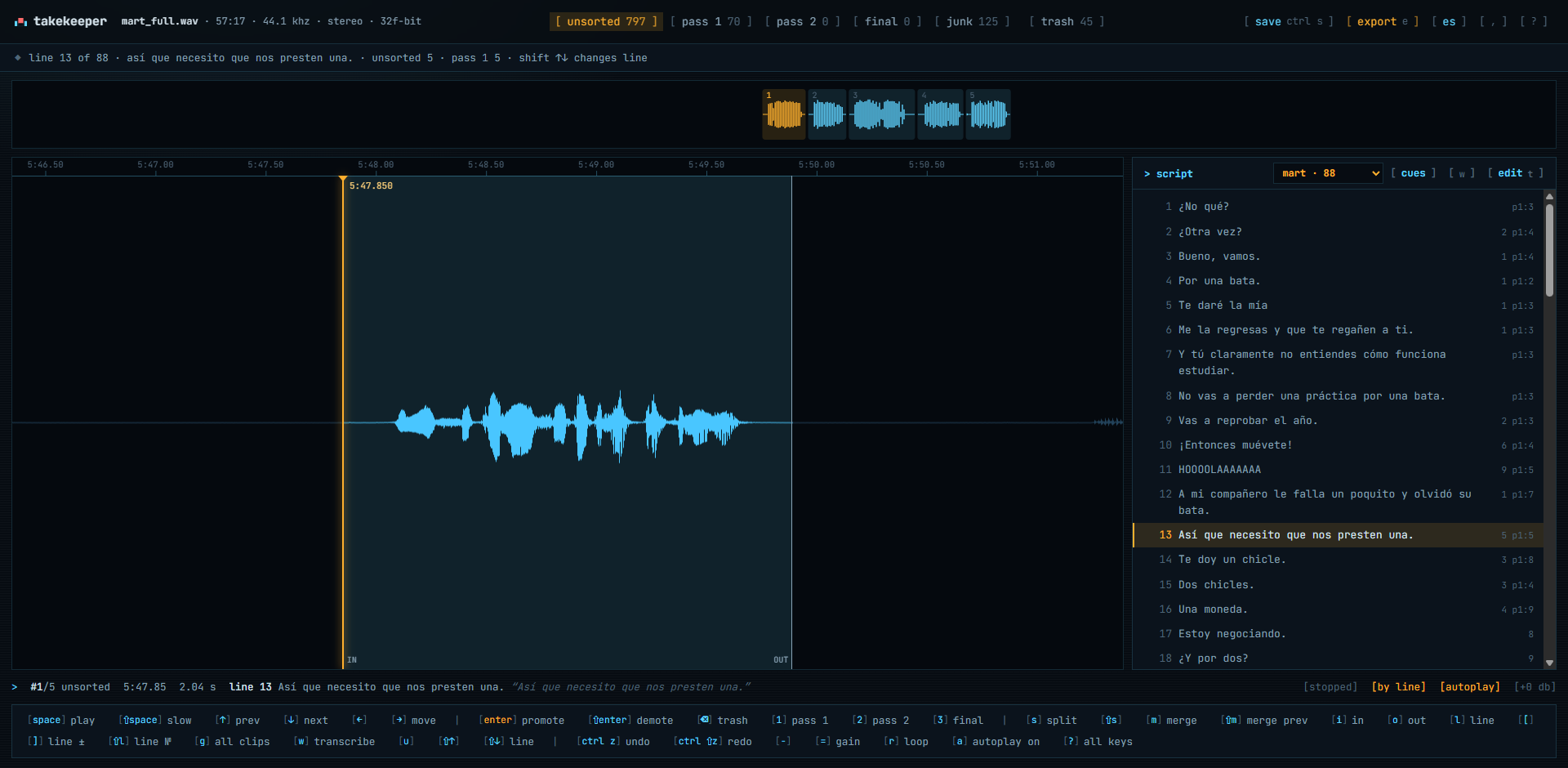
Takekeeper after matching: line 13 filtered to its five takes, with per-lane counts in the banner and per-line counts in the script panel
On the reference session the numbers came out like this: 88 of 88 lines matched, 93 takes that held several reads became 238 single reads, and 174 non-takes (breaths, slates, coughs, false starts that never reached a word) moved to the Junk lane on their own.
Now, about Junk. Junk is a guess, not Trash. It's where the app puts takes that transcribed as empty or wordless, and it never takes a line's last remaining take. But short real lines sometimes land there, because a two-word read in a quick voice can come back from the model as nothing much. In the screenshot below the Junk lane holds 125 takes, and the selected one is a full clean read of a short line that had no business being there. A quick pass through Junk with autoplay on, pressing Enter to rescue anything real, is part of the job. It takes a couple of minutes.
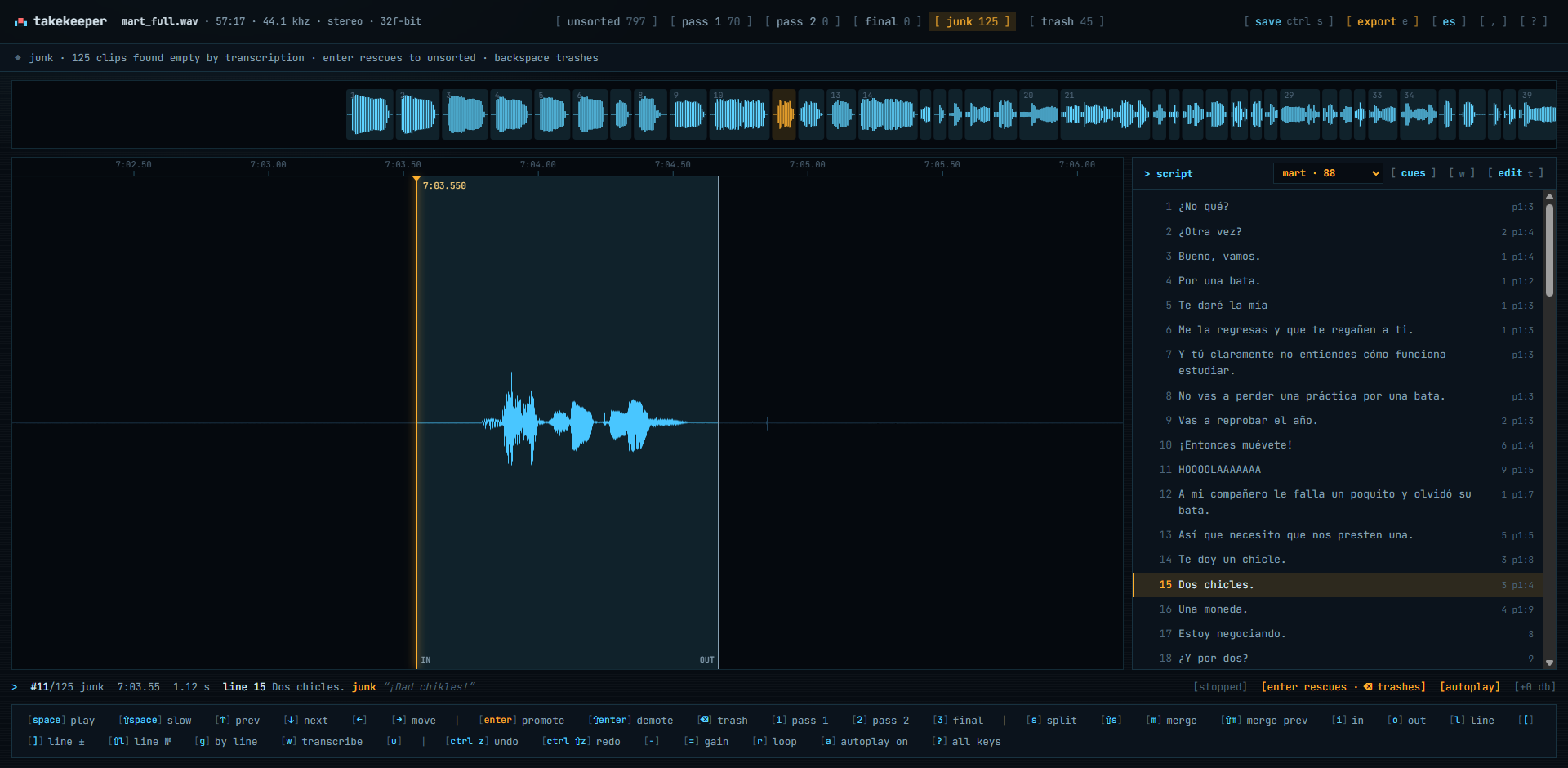
Takekeeper Junk lane with 125 takes; the selected take is a clean short read of a real script line that was guessed as junk
From there the sorting is the same as without transcription: sit in a lane, takes autoplay, Enter promotes, Backspace trashes, repeat on the next lane until Final holds one take per line. The difference is the export. With matching done, the export comes out in script order even though the recording jumped around, with the line number in every filename (mart_001a_line014.wav) and tiny silent WAVs between takes so the folder drops onto an FL Studio playlist already spaced. The reference session's 848 files were built in 0.7 seconds.
Platform note, said plainly: Chrome or Edge on desktop get GPU transcription, saving straight into a folder and one-click resume. Firefox sorts fine and downloads a zip, but it transcribes on the CPU, which is slow. Phones and tablets aren't the target. The interface is in English and Spanish, and both the script parsing and the transcription are tuned for both languages.
A privacy checklist for any tool that touches unreleased audio
I get that "we don't upload anything" is easy to say. Here's what I'd check before letting any tool near NDA material, mine included:
- Open the browser's network tab, load the tool, run the whole job. The only traffic should be the app's own files and, once, a model download. No request should carry audio or transcript.
- Does it need an account? An account is a place your data can be tied to. A tool that reads from disk and writes back to disk shouldn't need one.
- Where does the processing happen? If the answer involves a server, ask for the retention policy in writing. If it's your GPU, the question disappears.
- Where is the work saved? Takekeeper keeps lanes, cuts and transcripts in the browser's local storage and, with Ctrl+S, in a small .takekeeper.json file next to the recording. Both stay on your machine.
- Can you run it with the network cable unplugged after the first load? That's the simplest test there is.
- Does the export contain anything beyond the audio you chose? Byte-exact slices of your own WAV are easy to verify; re-encoded files are harder.
None of this is paranoia. It's the same diligence a studio applies to a courier. The difference is that with a browser tool you can verify it yourself in five minutes instead of trusting a PDF.
Questions people also ask
Do I need transcription at all, or is silence detection enough?
Silence detection alone is already good for most sessions. Transcription is optional; it adds line matching, better cuts and a script-ordered export, at the cost of about ten minutes per hour of audio.
Does the Whisper model download every time?
No. It downloads once (about 410 MB for small, about 140 MB for base) and is cached by the browser. After that, transcription works with no network at all.
Can it tell me which take is the best one?
No, and it shouldn't try. Transcription judges what a take is, never how good it is. Choosing the keeper is your job; the tool just removes the mechanical part around it.
What if my session was recorded out of order?
The matcher follows the recording's sequence and tolerates detours: going back a couple of lines and redoing them is handled correctly. Large jumps are handled too, and anything ambiguous is flagged for you to confirm.
Does it work in Firefox or on a laptop without a dedicated GPU?
Sorting works everywhere on desktop. Transcription needs WebGPU, which Chrome and Edge provide; Firefox falls back to the CPU and is slow. Integrated graphics work but take longer than the ten-minutes-per-hour estimate.

Pablo Dominguez
Full Stack Developer passionate about building interesting projects and learning new skills.