
A friend texted me last week: "What's a good vocal warmup app for Android that isn't a subscription?" I started typing a two-line reply and ended up with something closer to an essay. So here it is, cleaned up, for anyone else who has asked the same question.
If you're asking this, you're probably tired of two things. I know I was.
The first one is the sound. You open a warmup app, press play, and out comes a synthesized beep that sounds like a Nokia ringtone from 1998. You're supposed to match your voice to that? Matching a pure sine tone or a cheap MIDI patch is hard on the ears and hard on the pitch. Your brain has nothing to lock onto. After five minutes you're not warming up, you're fighting the reference.
The second one is the price. You find an app that actually sounds decent, tap the first exercise, and a paywall slides up asking for $9.99 a month or $79.99 a year. To play a scale. Something a $30 keyboard from a garage sale does perfectly well. I get that developers need to eat, but $60 to $120 a year for scales is a lot when you're a student, a choir member, or someone who just wants to sing better on Sunday.
Sounds familiar? Then let's do this properly. First, what a warmup app actually has to do for you. Then the one I'd install.
What a warmup app actually needs to do
Strip away the marketing and a warmup app has one job: replace the piano and the teacher standing next to it, for the fifteen minutes before you sing. That breaks down into a few concrete things.
1. Play notes that are in tune and pleasant to match. This is non-negotiable. The reference tone should sound like an instrument, ideally a piano, because that's what most of us learned to match in lessons and rehearsals. A rich tone with real harmonics gives your ear something to grab. A beep does not.
2. Start from YOUR range, not a fixed key. Here's the trick most apps miss. A soprano and a bass should not be running the same five-note pattern from the same C. If the app doesn't know where your voice sits, every exercise is either too low to feel anything or too high to be safe. The app should ask about your range once and transpose everything from there.
3. Build up gradually. A good warmup has a shape: a gentle opener in the middle of your voice (hums, lip trills, easy slides), then range work that stretches you a bit at a time, then agility once the voice is moving freely, then a cooldown to bring everything back down. Jumping straight into a two-octave arpeggio at 7 a.m. is how people hurt themselves.
4. Tell you what syllable and what technique you're working on. "Sing this scale" is not enough. On what? An "ee"? A "ng"? Is this a legato exercise or a staccato one? Should you be thinking about breath support or about keeping the larynx relaxed? Without that label, you're just making noise on pitches.
5. Not hold your voice hostage. If the basic function of playing scales in your range is behind a recurring paywall, that's a rental, not a tool.
Turn that into a checklist and you can judge any app in about three minutes on the Play Store:
- Does it sound like a real instrument, or a beep?
- Does it ask for my range, or does everything start on a fixed C?
- Do the routines go gentle, range, agility, cooldown, or is it a flat list of scales?
- Does each exercise name the syllable and the technique?
- Does it work fully without a subscription?
Five questions. I've run dozens of apps through them. Most fail on question one before I even get to the money.
The answer: Scalita on Android
The one that passes all five for me is Scalita. It's an Android app, it's free to use in full, and I'll walk you through it the way it actually happens on day one, because that's the only honest way to review a warmup app.
Your first session, step by step
Step 1: Install it and tell it your range. Right after opening, Scalita asks you to sing your lowest comfortable note and your highest comfortable note into the microphone. Not your absolute extremes, just what feels easy. If you'd rather not sing at your phone in the kitchen, you can pick a voice type instead (soprano, alto, tenor, bass and so on) and adjust later. That's it for setup.
Step 2: Everything transposes to you. From that moment, all 21 built-in scales and all 14 built-in routines live inside your range. A five-note scale for a bass starts where a bass can actually feel it. The same exercise for a soprano starts an octave and a bit higher. You never touch a key selector unless you want to.
Step 3: Pick a routine and press play. The home screen keeps it simple. There's a Continue card at the top that resumes whatever you left unfinished, and a Quick access list below with the routines you actually use most.
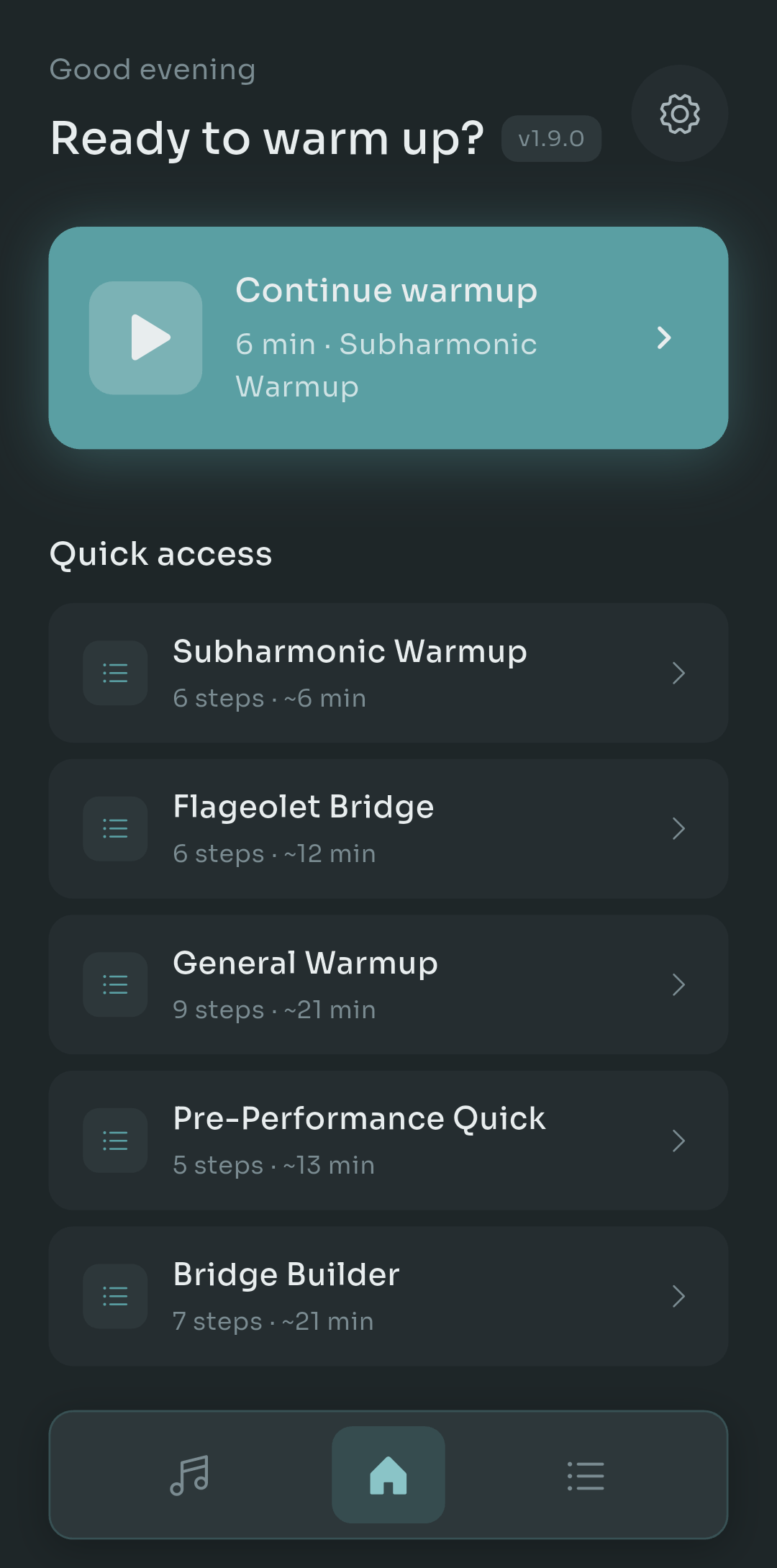
Scalita home screen showing a Continue warmup card and a Quick access list of routines with step counts and durations
Notice the durations next to each routine in that screenshot: 6 minutes, 12 minutes, 21 minutes. That matters more than it looks. On a Tuesday night when you've got ten minutes before choir, you grab the 6-minute one. On a Saturday before a gig, you take the 21. No guessing, no scrolling through a hundred exercises wondering how long this is going to take.
Step 4: Follow the shape. The built-in routines are structured the way I described above. Take the General Warmup: it opens with gentle mid-range work, moves into range extension, then agility patterns, and closes with a cooldown. Each step tells you the syllable ("Nee", "Mum", a lip trill, whatever) and the technique focus, so you're not just chasing dots.
The full library lives in the Practice tab. The four guided modes sit at the top and the routines list is underneath, each with a one-line description of what it's for: agility and runs for melismatic singing, breath control and stamina for sustained phrases, and so on.
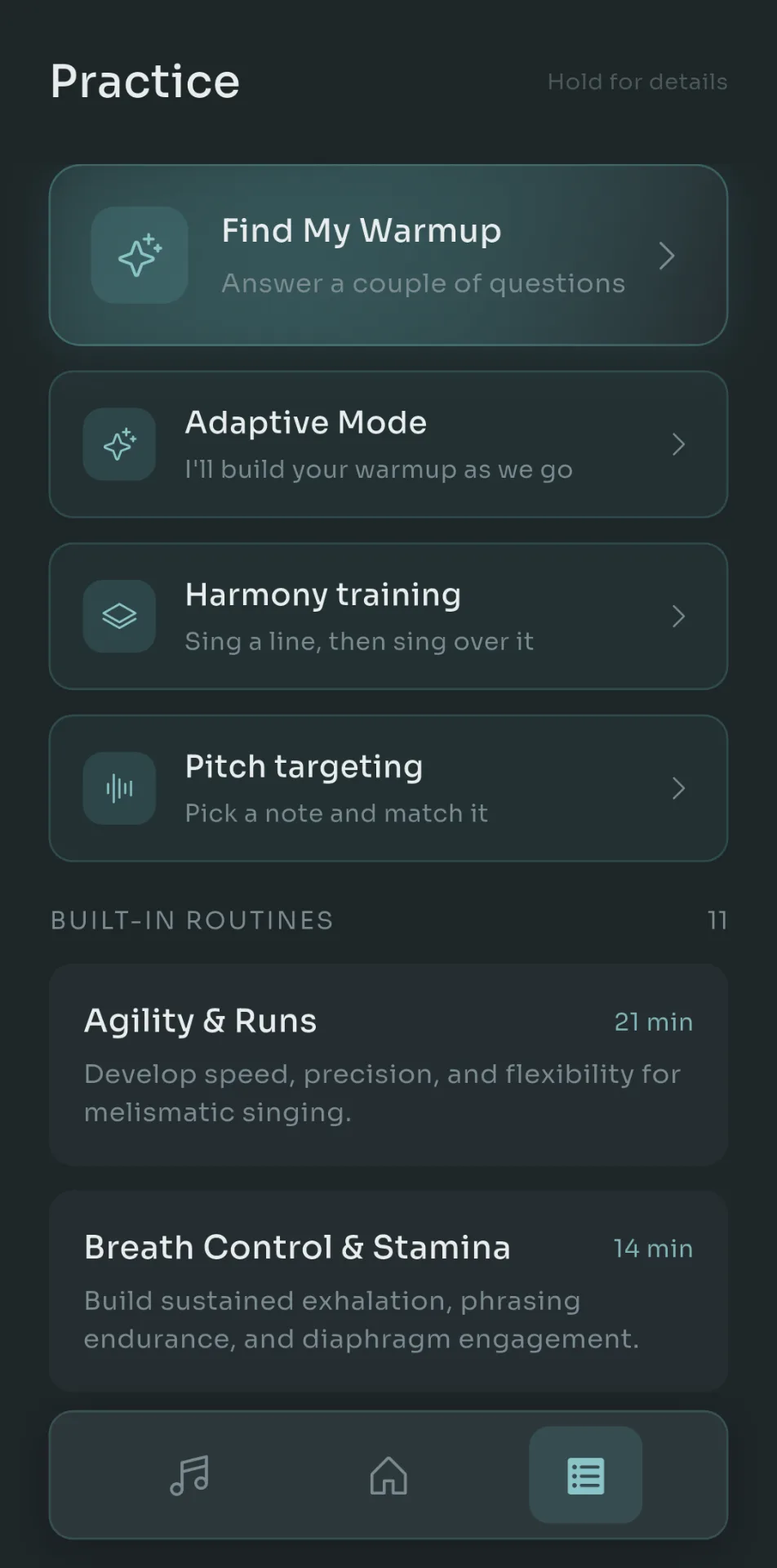
Scalita Practice tab with Find My Warmup, Adaptive Mode, Harmony training and Pitch targeting at the top, and built-in routines like Agility & Runs and Breath Control & Stamina below
Quick tip: long-press any routine or scale to see the details before you commit. It saves you from starting a 21-minute session when you meant to do a 6.
The piano
Now, let's talk about the thing that made me stop looking at other apps.
Scalita's reference tone is a piano. Not a synth patch labelled "piano". Real Salamander Grand Piano samples, on every single key, bundled inside the app. If you've spent time around sample libraries you'll know the Salamander: it's a Yamaha C5 recorded properly, and it's the sound a lot of people use when they want a grand piano without a grand piano budget.
Two consequences of that decision. First, it sounds like a piano, which means your ear locks onto the pitch the way it does in a lesson. Second, because the samples ship with the app rather than streaming from a server, it works with no signal at all. On a plane. In a basement rehearsal room. In a dressing room where the Wi-Fi password is a rumor. I've warmed up in all three.
Don't get me wrong, a beep will technically give you a frequency. But if you've ever tried to match a sine wave on a tired voice, you know the difference between "technically a pitch" and "something I can actually sing to".
The live pitch monitor
Put in earphones (this part matters, more on that in a second) and the player turns into a live pitch display. The target notes appear as dots on a grid of note names, and your voice draws a bright trail over them as you sing.
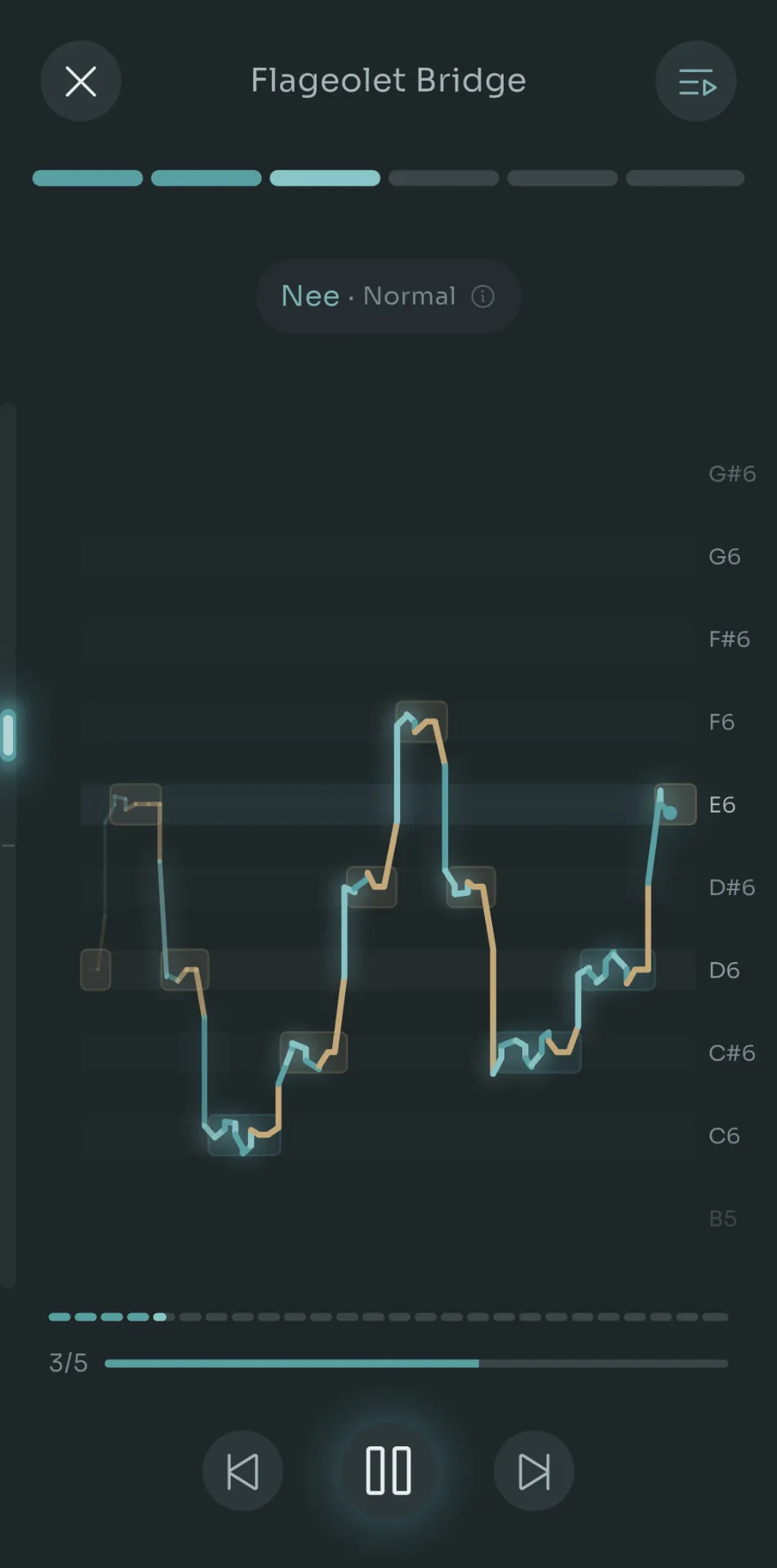
Scalita player mid-exercise in the Flageolet Bridge routine, showing the syllable chip Nee Normal, target note dots and the singer's live pitch trail against note labels
That screenshot is from the Flageolet Bridge routine, step 3 of 6. Look at the chip near the top: "Nee · Normal". That's the syllable and the technique setting for this exercise, right there while you sing, with an info button if you forget what the technique means. The bright line is the singer. The little boxes are where the notes should be. You can see the voice overshoot on the way up to F6 and settle back in. That kind of instant feedback is exactly what a teacher gives you with a raised eyebrow, and it's the thing you lose completely when you practice alone.
Why earphones? Because the microphone needs to hear you, not the piano coming out of the phone speaker. With earphones in, the piano goes to your ears and only your voice reaches the mic. Any cheap wired pair works. Bluetooth works too, though wired has less latency if you're sensitive to that.
I get that some people find pitch displays stressful. If that's you, turn it off and just sing to the piano. It's optional, not a gate.
When you don't know what to do today
Two of the guided modes deserve a sentence each, because they answer the most common question I get after "which app": "OK, but which routine?"
Find My Warmup asks you a couple of questions (how does the voice feel, how much time do you have, what are you singing later) and hands you a routine that fits. Adaptive Mode goes one step further: it listens as you sing and builds the warmup on the fly, easing off or pushing on based on how you're actually doing rather than how you said you were doing. Both of those have their own deeper posts on this blog, so I won't repeat myself here.
There's also Harmony training (sing a line, then sing over it) and Pitch targeting (pick a note and hit it), which are less about warming up and more about ear work. Nice to have, not the reason you're here.
Finishing a session
When a routine ends you get a small summary: how many exercises, how long it took, and the range you actually covered. Below that, a row of dots for the days of the week, lighting up as you show up.
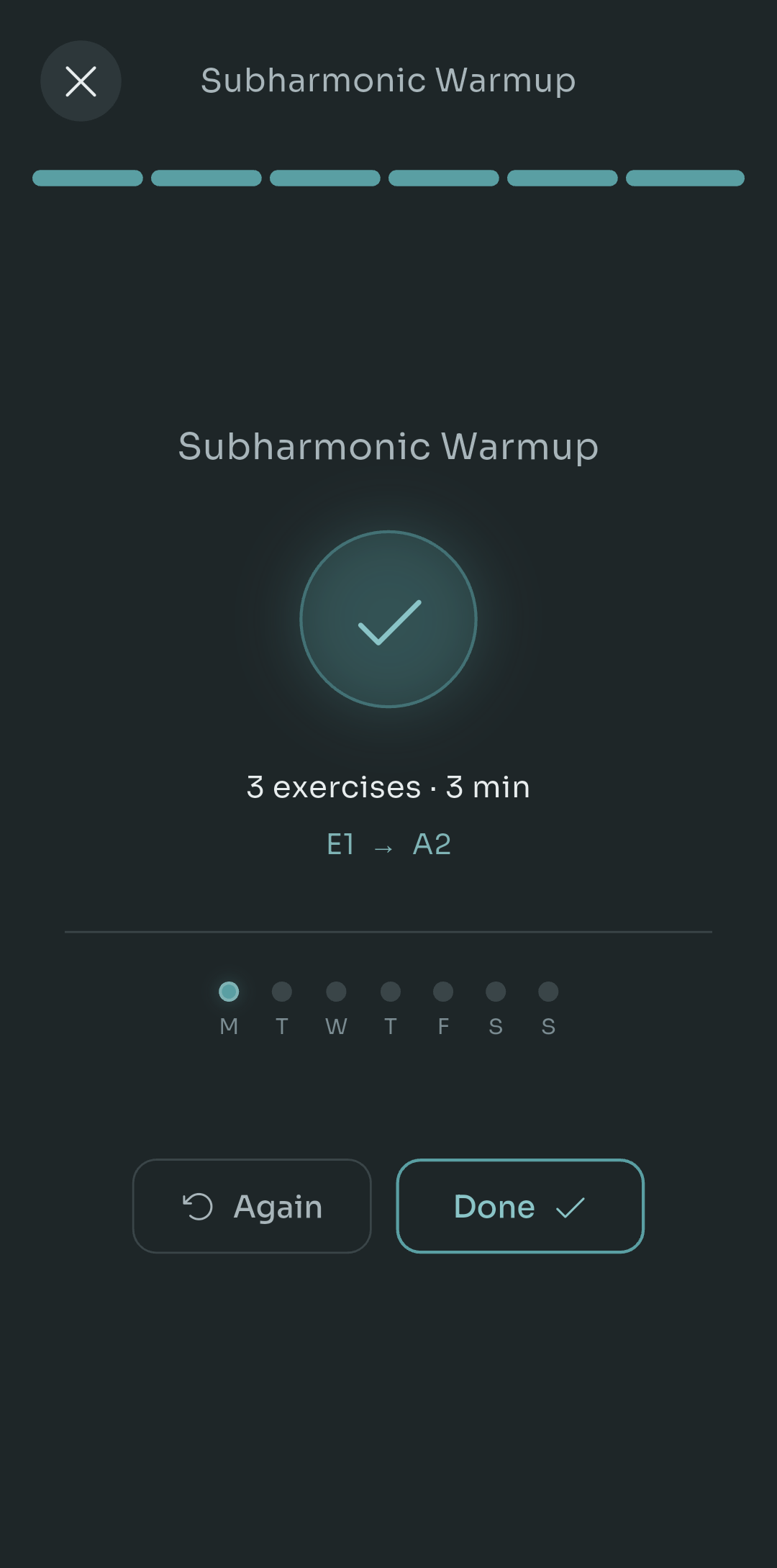
Scalita end-of-routine screen with a checkmark, a summary of exercises, time and range covered, weekly practice dots for Monday through Sunday, and Again and Done buttons
That one's a Subharmonic Warmup that ran from E1 to A2, which tells you the range detection isn't just for tenors and sopranos. It handles the weird corners of the voice too. And the weekly dots are the gentlest kind of streak: no fire emoji, no guilt notification, just a quiet record of whether you did the work this week.
Let's talk about money
Here's the part you actually asked about.
Everything I've described so far works for free. The 21 scales, the 14 routines, the range detection, the Salamander piano, the live pitch monitor, Find My Warmup, Adaptive Mode. No trial that expires, no "first three exercises free". You install it and you can warm up properly, in your range, with a real piano sound, indefinitely.
There is a Pro tier. It costs $4.99, once. Not per month, not per year. Once. It unlocks three things:
- Lifts the caps on custom content, so you can build as many of your own scales and routines as you want
- The practice recorder, so you can listen back to a session
- Editing the built-in routines, so you can tweak a step or swap a syllable instead of rebuilding from scratch
If you're a teacher writing routines for students, or someone who likes to tinker, Pro is worth it on day one. If you just want to warm up, you may never need it.
Now compare that to the subscription apps. I won't name any, but the pattern is the same across the category: somewhere between $60 and $120 a year, and the moment you stop paying, the scales stop playing. Over three years of singing that's $180 to $360 for the privilege of hearing a C major pentascale in a synth voice. Scalita over the same three years is $0, or $4.99 if you want Pro. That's not a rounding error. That's a used microphone, or two months of lessons.
A warmup app should cost less than the earphones you use with it. Anything else and you're renting your own voice back.- Pablo Domínguez
The platform question
Let me be direct, because this is the part where I'd rather disappoint you now than after you've read 2,000 words.
Scalita is Android only right now. iOS is on the roadmap, and I know that's cold comfort if you're holding an iPhone. But the question my friend asked was specifically about Android, and on Android this is the one I'd point you to without hesitation. If you're on iOS, bookmark this and check back, or run the five-question checklist above against whatever you find in the App Store. The checklist works on any platform.
Languages and note names
One last thing, and it's the one that gets skipped in most reviews written from the US or the UK.
A huge share of the people asking "what's a good vocal warmup app" are not in an English-speaking country. They're in São Paulo, Madrid, Lyon, Berlin, Buenos Aires. And many of them learned music with Do Re Mi, not C D E. An app that only speaks English and only shows letter names is quietly telling half the singing world it isn't for them.
Scalita ships in English, Spanish, French, Brazilian Portuguese and German. And in settings you choose between solfège (Do Re Mi Fa Sol) and letter names (C D E F G) for every note label in the app: the scale list, the pitch monitor grid, the end-of-session range summary. Pick whichever one your brain thinks in.
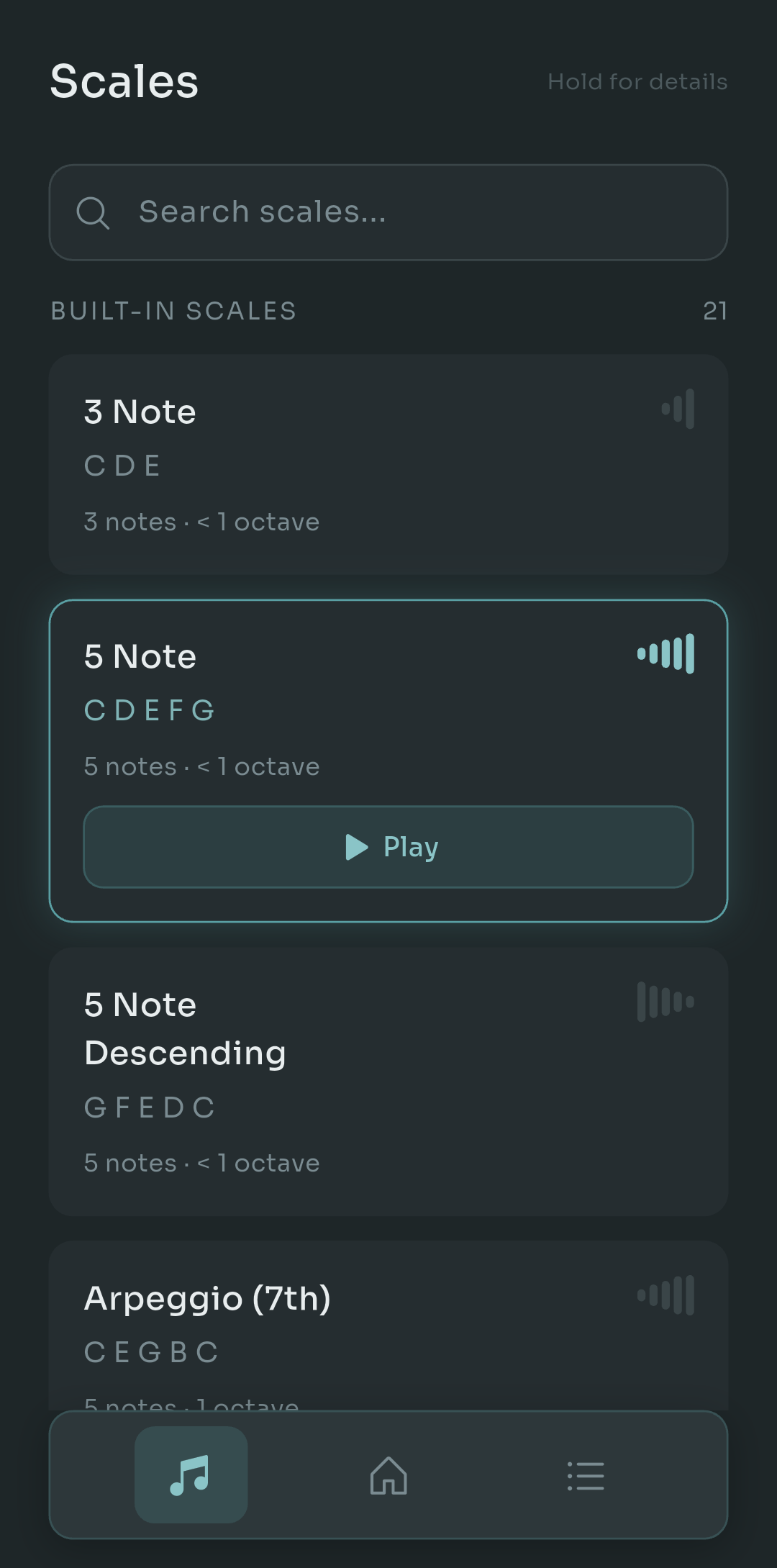
Scalita Scales tab listing built-in scales such as 3 Note, 5 Note, 5 Note Descending and Arpeggio (7th), each with its note names, span and a small shape preview
That's the Scales tab with letter names on. Each of the 21 scales shows its notes, how much of an octave it spans, and a little bar preview of its shape so you can tell an ascending pentascale from a descending one at a glance. Flip the setting and those same cards read Do Re Mi Fa Sol. Same piano, same range, your language.
The short version, for the group chat
If my friend had only wanted the two-line answer, here it is.
A vocal warmup app needs to sound like a real instrument, start from your range, build up gradually, tell you the syllable and technique, and not charge rent. On Android, Scalita does all five for free, with real Salamander grand piano samples that work offline, a live pitch monitor when you plug in earphones, 21 scales and 14 routines that transpose to your voice, and a single $4.99 Pro purchase if you want to build your own content or record yourself. Android only for now, iOS coming. Five languages, solfège or letters.
Your next steps are simple. Install it, sing your lowest and highest comfortable note, and run the 6-minute routine tonight. Then run the five-question checklist against whatever app you were using before. I have a feeling you'll uninstall it.
And if you've found another app that passes the checklist without a subscription, on any platform, tell me in the comments. I'd genuinely like to know. The more good options singers have, the fewer of us end up matching our voices to a ringtone.
Also available in

Pablo Dominguez
Full Stack Developer passionate about building interesting projects and learning new skills.