
Introduction
Last month I was in a rehearsal room two floors underground with exactly zero bars of signal, trying to open a singing app I'd already paid for. It wanted me to log in. Then it wanted to verify my subscription. Then it showed me a spinner for about forty seconds and gave up.
I ended up warming up against a guitar tuner. Sounds familiar?
A while back I wrote about offline notes apps and why a text editor has no business asking for your email address. A singing app has an even higher bar, and here's the reason: what you sing into your phone is a recording of your voice. Your cracked high notes, your 7am hums in the car, the harmony you tried four times and still didn't land. That's about as personal as data gets, and an app that records it should be held to a stricter standard than one that stores your grocery list.
So the question I keep getting asked is simple: which singing apps work offline, with no account and no ads? Let's set the bar first, then get to the answer.
Setting the Bar: Six Things a Singing App Has to Get Right
I get that "privacy-friendly" has become a marketing word. So instead of vibes, here's a concrete list. An app either does each of these or it doesn't, and you can check every one of them yourself.
1. It works with no signal. Not "caches a few things" but fully works. That means the reference sounds are bundled inside the app, not streamed from a server. Think about where singers actually practice: backstage, in the car, in a church basement, in a rehearsal room with walls thick enough to stop a phone signal dead. If the piano tone you're matching has to download first, the app is useless in exactly the places you need it.
2. No account required to use any feature. I want to underline any. Plenty of apps let you poke around without logging in and then lock the useful parts behind a sign-up. That's a sign-up wall with a delay. If a feature exists, you should be able to use it without handing over an identity.
3. No ads. This one matters more for singing than for most things. Warming up is a concentration exercise. An interstitial between your lip trills and your first scale breaks the flow completely. And there's a quieter cost: ads need a network connection and an ad SDK, and ad SDKs are exactly where most of the tracking lives.
4. No analytics or data collection. Not "anonymized", not "only crash reports". Zero. A singing app knows when you practice, how long, how often you miss a note, and possibly what your voice sounds like. None of that needs to leave your phone to make the app work.
5. Recordings stay on the device. This is the non-negotiable one. Your worst takes are nobody's business. Not the developer's, not a cloud provider's, not a machine learning pipeline's. If you can't find a plain answer to "where do my recordings live?", assume the answer is "not only on your phone".
6. A price you pay once. Here's the thing people miss: a subscription is an account problem in disguise. Something has to verify every month that you're still paying, and that something needs a login and a server. A one-time purchase through the store you already use has no such requirement, which is why it pairs naturally with points 1 and 2.
Six points. Not one of them is exotic. And yet, when I went through the top results for "singing app" on Android, most failed on at least three. Now, let's talk about the one that didn't.
The App Answer: Scalita on Android
Scalita is the app I've settled on, and it's the one I hand to people who ask me this question. It clears all six points, so let me walk through them in order rather than just saying "trust me".
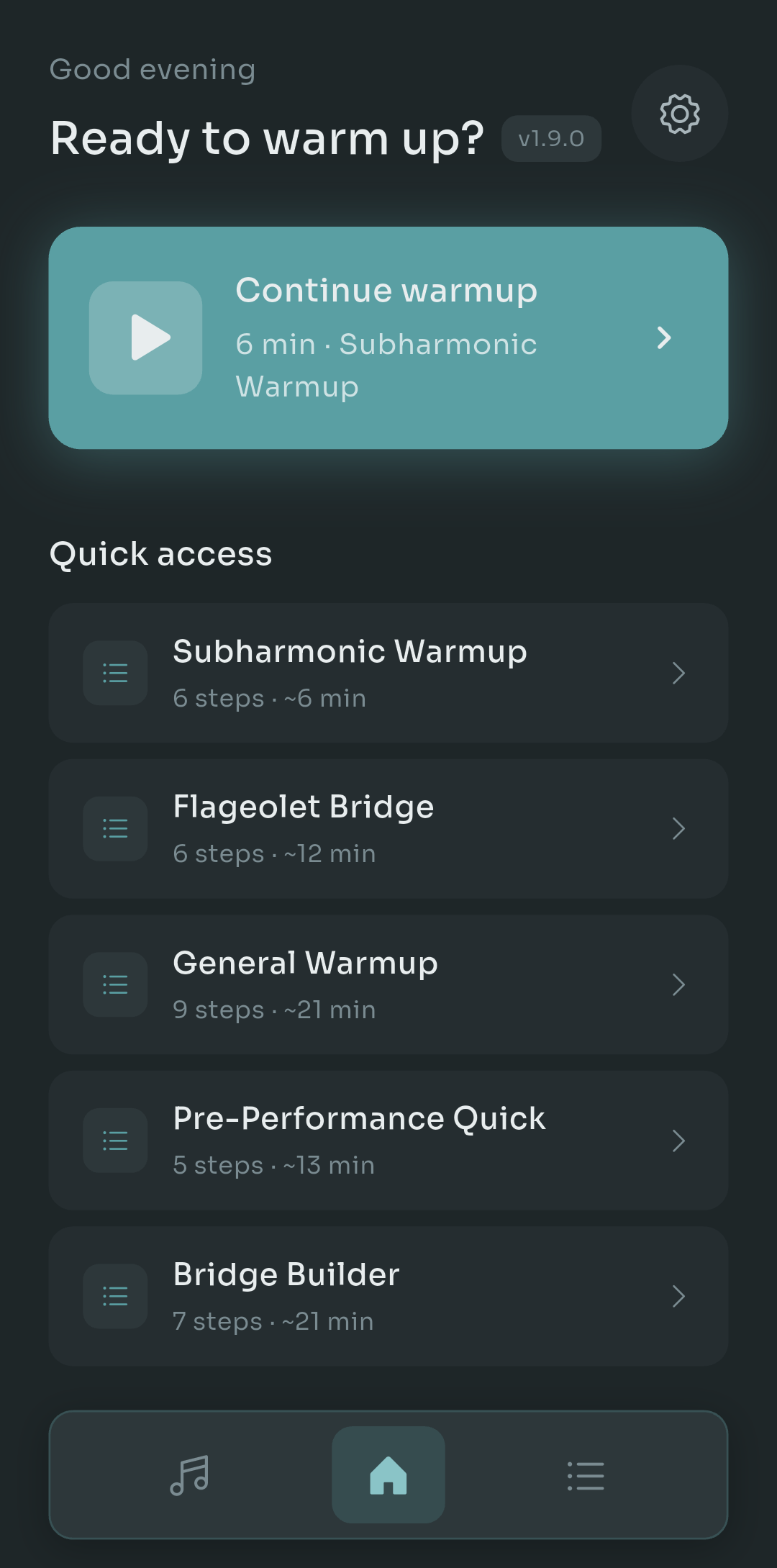
Scalita home screen showing a Continue warmup card and a list of warmup routines, with no login or profile anywhere
This is the home screen, and it's the whole pitch in one image. Notice what isn't there: no login button, no profile avatar, no sync status, no banner. It opens straight to Continue warmup with the routine you were last doing (a 6 minute Subharmonic Warmup in my case) and a quick access list underneath. Tap and you're singing. That's what "no account for any feature" looks like in practice.
Offline: the piano samples ship inside the app. Every reference note, every scale, every warmup routine plays from local files. I tested this properly: airplane mode on, phone restarted, app opened. Everything worked, including the warmups and the harmony tools. Nothing waited for a download.
No ads, no analytics, no data collection. The Play Store data safety section lists no data collected and no data shared, and the app behaves that way. There's no ad SDK in it to leak anything even by accident.
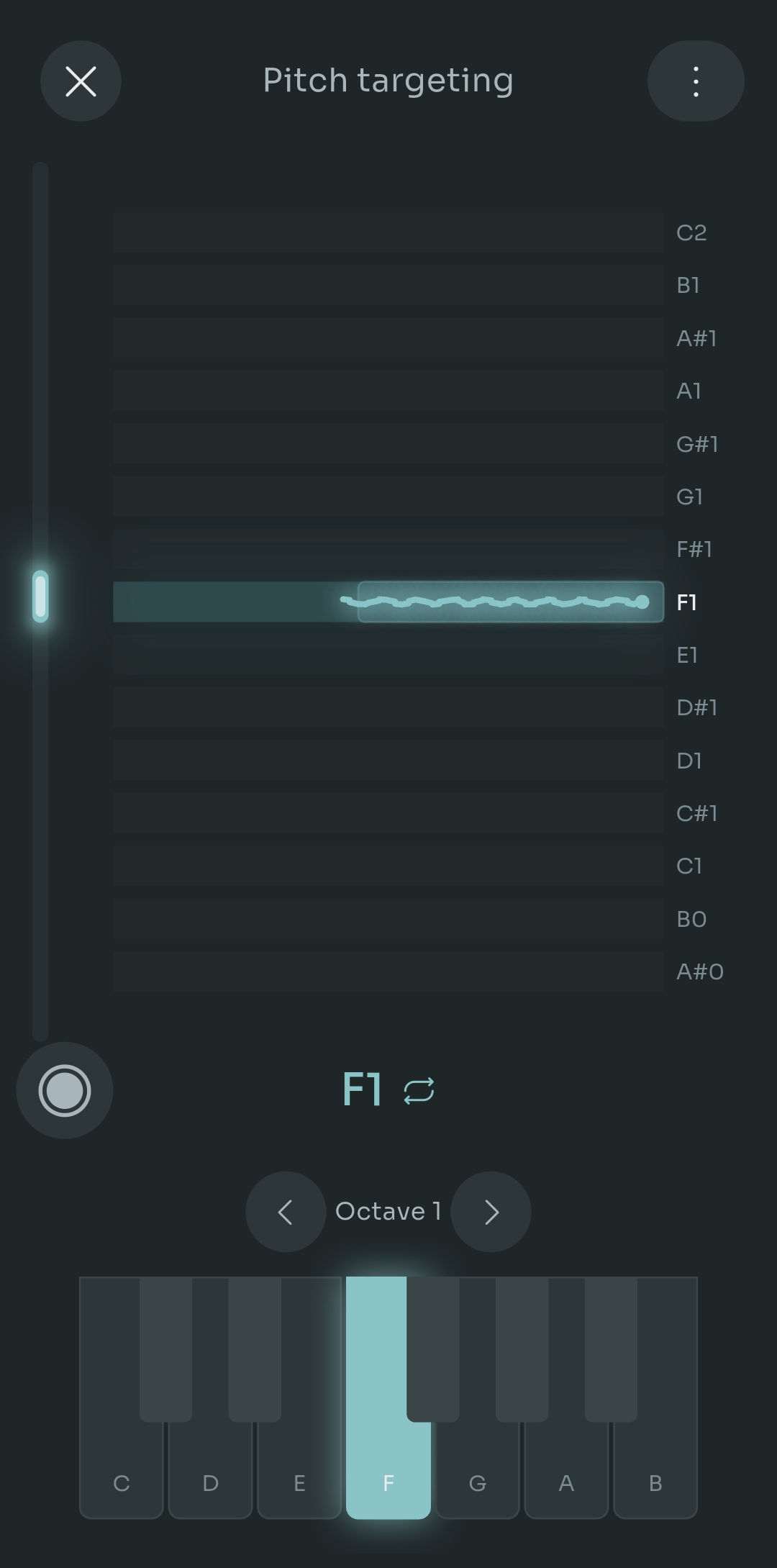
Scalita pitch targeting screen with a target note of F1 highlighted, a live pitch trace wobbling along the target line, and a piano keyboard at the bottom
This is the Pitch targeting screen, which is where the recording question actually comes up. You pick a note (F1 here, low enough that I'm clearly practicing my basement register), sing, and the teal trace shows how close you're holding it. That wobbly line is my voice. When you record a practice take here, it stays on the phone. Same for saved harmonies. There's no upload step because there's nowhere to upload to.
Two features go a step further. Range detection and the Scale Detector listen to you in real time but keep no audio at all. They analyze pitch as it comes in and throw the signal away. Nothing is written to storage. For the more nervous among you (I count myself in), that's the right default.
The best privacy feature isn't encryption. It's an app that never had your data in the first place.- Pablo Domínguez
Price: the free version is genuinely usable, and Pro is $4.99 once through Google Play. Not per month. Not per year. Once. Because it's a Play Store purchase, there's no Scalita account involved: if you switch phones, you open Settings and hit restore on the same Google account you bought it with. Google verifies the purchase, the app never learns who you are.
Two small extras that made me smile: the interface comes in five languages, and you can show notes as solfege or letter names. If you grew up on do re mi and your teacher talks in C D E, you don't have to translate in your head anymore.
Now the honest limitation, because I'd rather you hear it from me than find out after a search: Scalita is Android only right now. iOS is on the roadmap but it isn't shipped. If you're on an iPhone, the checklist below is your best friend until it lands.
A Checklist You Can Apply to Any App
Apps change hands, get acquired, and pivot to subscriptions. So rather than trusting a recommendation forever (including this one), here's how to check any singing app yourself in about five minutes. It splits into two places: the store listing and the app's own settings.
In the Play Store, scroll to Data safety and look for:
- "No data collected" and "No data shared" as the headline. Anything else, expand it and read.
- "Audio" listed under collected data types. For a singing app this is the red flag, full stop.
- "Device or other IDs" or "App activity". These are the fingerprints of an analytics SDK.
- "Contains ads" in the listing details. If it's there, assume an ad network is inside.
- The in-app purchase line. A single price is good. "Per item" with a range often means subscriptions.
Inside the app, open Settings and look for:
- Any "Sign in", "Account" or "Sync" entry. If it exists, some feature depends on it.
- A plain statement of where recordings are stored, ideally with a way to delete them locally.
- A toggle for analytics or "help improve the app". Its presence means collection is happening unless you turn it off.
- A "Restore purchase" button rather than a "Log in to restore" button.
Quick tip: the fastest test of all costs nothing. Turn on airplane mode, restart your phone, open the app and try a full warmup including a reference tone. If anything spins, stalls or asks you to reconnect, you have your answer. I've watched apps with "works offline" in their description fail this in under ten seconds.
Where This Leaves You
So, which singing apps work offline with no account and no ads? On Android, Scalita is the one that clears the full bar: bundled sounds that work with zero signal, no login for any feature, no ads, no data collection, practice takes and harmonies that stay on your phone, two listening tools that keep no audio at all, and a $4.99 one-time Pro restored through Google Play rather than through an account.
On iOS, not yet. I'll update this post the day that changes.
But here's the trick that outlasts any single app: keep the six-point bar and the airplane mode test in your head. Your voice is yours. An app that wants to record it should earn that, and the good ones make it easy to verify.
If you've found another app that passes all six, especially on iPhone, tell me in the comments. I'd genuinely like to add it here. And if you try Scalita, I'd love to know whether the Subharmonic Warmup does for your low notes what it did for mine.

Pablo Dominguez
Full Stack Developer passionate about building interesting projects and learning new skills.